Microsoft Face Recognition - Add person's face
Important: This connector and its actions have been removed from Nintex Workflow and can now be found in Nintex Gallery.
Use the Microsoft Face Recognition - Add person's face action A tool for building the processes, logic, and direction within workflows. Actions are the steps the workflow performs to complete a process. to add an image of a person's face to a person group.
You must already have a Person group and Person defined in Microsoft Face Recognition.
For more information about Microsoft Face Recognition, go to Microsoft Face Recognition.
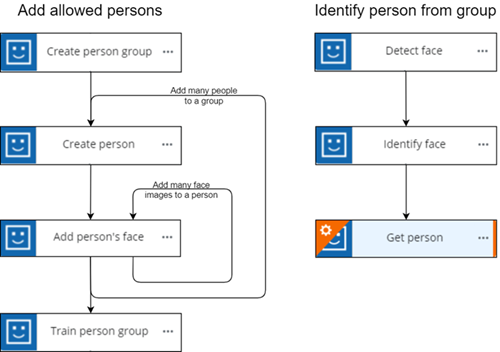
 Microsoft Face Recognition actions flow:
When using Microsoft Face Recognition, you must configure actions in a particular order, as some actions are dependent on data from others. The required action flow is shown below:
Configure the Microsoft Face Recognition - Add person's face action
-
Add the action to the workflow and open the action configuration panel. For more information, see Add an action to the workflow.
- Select a Connection. If you do not have a connection, see Add a connection.
- Select the Person Group ID of the person you're adding.
- Select the Person ID of the person you're adding.
- Insert a variable that contains the Face image file you want to add.
Microsoft Face Recognition - Add person's face action fields and settings
|
Section |
Field |
Description |
Variable types |
|---|---|---|---|
|
(Unlabeled) |
The Microsoft Face Recognition connection to use to add the image of the person's face. To refresh the available connections, click |
(n/a) |
|
| Person group ID |
The person group that contains the target person. How do I get the Person group ID from Microsoft Face Recognition?
You can use the output object of a Microsoft Face Recognition - Get person groups action to retrieve the Person group ID value. |
Text, Decimal, Integer, Boolean, DateTime, Collection | |
| Person ID |
The target person that the face is added to. How do I get the Person ID from Microsoft Face Recognition?
You can use the output object of a Microsoft Face Recognition - Get person action or a Microsoft Face Recognition - Create person action to retrieve the Person ID value. |
Text, Decimal, Integer, Boolean, DateTime, Collection | |
| Face image |
The variable containing the image file of the person's face. Note: Your tenancy's default file storage location must be configured to hold files for later reference by the workflow. This location is used for uploaded files and for files stored as output from actions. |
File | |
| Output | Face ID |
Stores the result of the action as an object. See Microsoft Face Recognition API for more details. The following values are returned:
|
Object |
 .
.