Microsoft Face Recognition - Get person
Important: This connector and its actions have been removed from Nintex Workflow and can now be found in Nintex Gallery.
Use the Microsoft Face Recognition - Get person action A tool for building the processes, logic, and direction within workflows. Actions are the steps the workflow performs to complete a process. to retrieve the details of a specific person from a person group.
For more information about Microsoft Face Recognition, go to Microsoft Face Recognition.
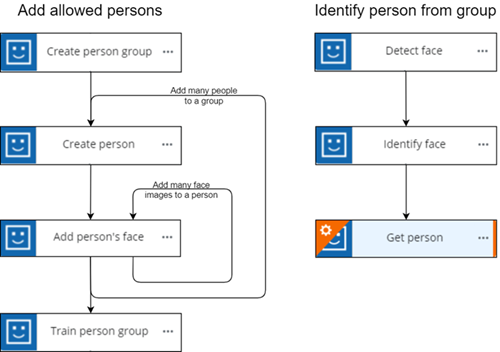
 Microsoft Face Recognition actions flow:
When using Microsoft Face Recognition, you must configure actions in a particular order, as some actions are dependent on data from others. The required action flow is shown below:
Configure the Microsoft Face Recognition - Get person action
-
Add the action to the workflow and open the action configuration panel. For more information, see Add an action to the workflow.
- Select a Connection. If you do not have a connection, see Add a connection.
- Select the Person group ID.
- Select a Person ID.
Microsoft Face Recognition - Get person action fields and settings
|
Section |
Field |
Description |
Variable types |
|---|---|---|---|
|
(Unlabeled) |
The Microsoft Face Recognition connection to use to retrieve the person's details. To refresh the available connections, click |
(n/a) |
|
| Person group ID |
The person group that contains the list of people. How do I get the Person group ID from Microsoft Face Recognition?
You can use the output object of a Microsoft Face Recognition - Get person groups action to retrieve the Person group ID value.
|
Text, Decimal, Integer, Boolean, DateTime, Collection | |
| Person ID |
The unique identifier of the person. How do I get the Person ID from Microsoft Face Recognition?
You can use the output object of a Microsoft Face Recognition - Get person action or a Microsoft Face Recognition - Create person action to retrieve the Person ID value. |
Text, Decimal, Integer, Boolean, DateTime, Collection | |
| Output | People |
Stores the result of the action as an object. See Microsoft Face Recognition API for more details. The following values are returned:
|
Object |
 .
.