Types of Credentials
These types of credentials can be created in the Credentials Vault from within Nintex RPA Console Plus:
-
OAuth Authentication (Relevant to Microsoft 365 modern authentication)
Each type is displayed in the Credentials vault section of the Settings tab in the Console Plus:
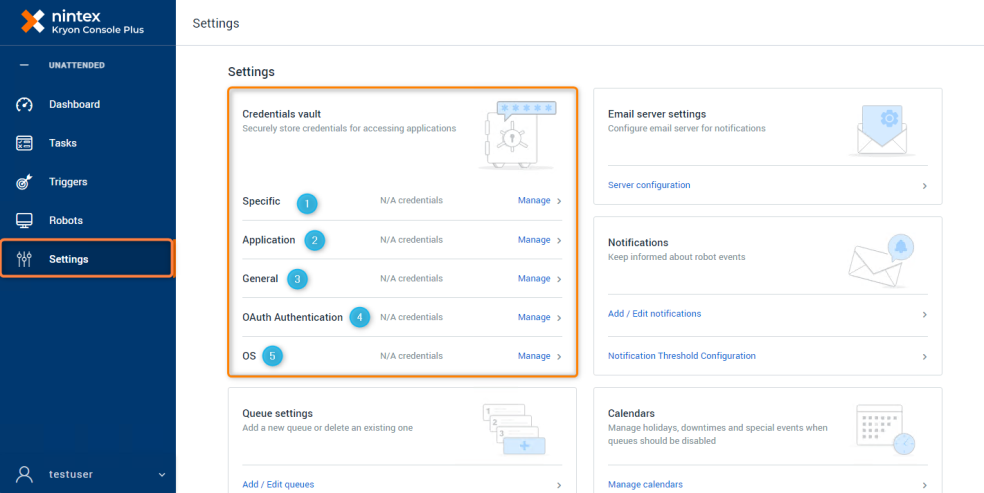
-
 Specific User Credential
A Specific User credential is a username-password combination that can be used by any robot for a specific application. Use this type of credential when the relevant application:
-
allows a user to log in from any machine; and
-
permits multiple concurrent uses of the same credentials
To create a Specific User Credential, see Adding Credentials in Console Plus.
-
-
Application User Credential
An Application User credential is a username-password combination for a specific application and the specific robot using it. Use this type of credential when the relevant application:
-
associates a user with a specific robot (the friendly name of a robot); or
-
does not permit multiple concurrent uses with the same credentials
When a wizard accesses an Application User credential, Nintex will fetch the correct username-password combination according to the robot on which the wizard is currently running.
To create an Application User Credential, see Adding Credentials in Console Plus.
-
-
General User Credential
A General User credential is a username-password combination that is used to access a general computing resource (such as a mail server or database), as opposed to a specific application.
To create a General User Credential, see Adding Credentials in Console Plus.
-
OAuth Authentication
This Authentication credential is relevant to customers who are using Microsoft 365 Exchange modern authentication method using Application and Tenant / Object ID.
Use the OAuth Authentication to store tokens for application authentication such as Office 365. This will allow allowing Robots to receive and send emails through Microsoft Exchange when running automations.
Read more about Working with Microsoft 365 Exchange and Modern Authentication.
To create an OAuth Authentication, see Adding Credentials in Console Plus.
-
OS User Credential
An OS User credential is a username-password combination that is used by robots to log in to Windows. With this, the robot can unlock a computer to run a wizard. You can also create an OS User credential for a robot when you are approving the robot during onboarding, from the Robots list and the Robot details page.
To create an OS User Credential, see Adding Credentials in Console Plus.
If you have CyberArk Vault integration configured, you can add CyberArk credentials here. See Add CyberArk Credentials.