Rename Folder (Lists)
What does it do?
The Rename Folder (Lists) wizard renames a folder in a SharePoint list.
How is it used?
Folders are used to organize list items. In a business application, for example, SharePoint may have a folder for each client's order history. If that client is no longer actively doing business, a workflow could rename the folder to indicate the account is currently closed.
 Specify List
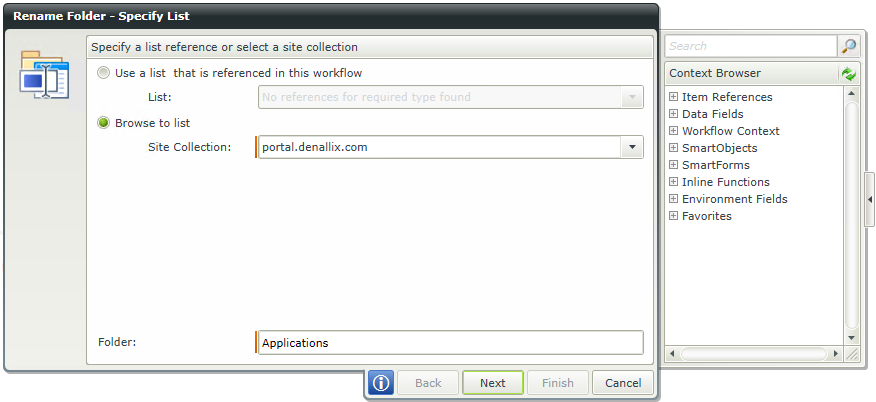
Select the SharePoint list and folder that should be renamed by either using a reference created earlier in the workflow or by browsing to a site.
| Field | Description | Sample Value |
|---|---|---|
| List | Use this option if a reference was created earlier in this workflow for the List. | Click the drop-down list to select the reference name. |
| Site Collection | If no reference is available, browse to the item on a registered SharePoint Site Collection. The Site Collection field is populated with the default Site Collection. | Choose a site collection from the available site collections that have the K2 for SharePoint app registered. If there is only one it is auto-selected. |
| Folder | Name of the folder to be renamed | Type a value, or drag a value from the Context Browser such as a pre-configured Data Field, Item Reference or a SmartObject Load method. Note that when a SmartObject Load method is used, an input property is required for the correct data to load. |
Specify List (cont.)
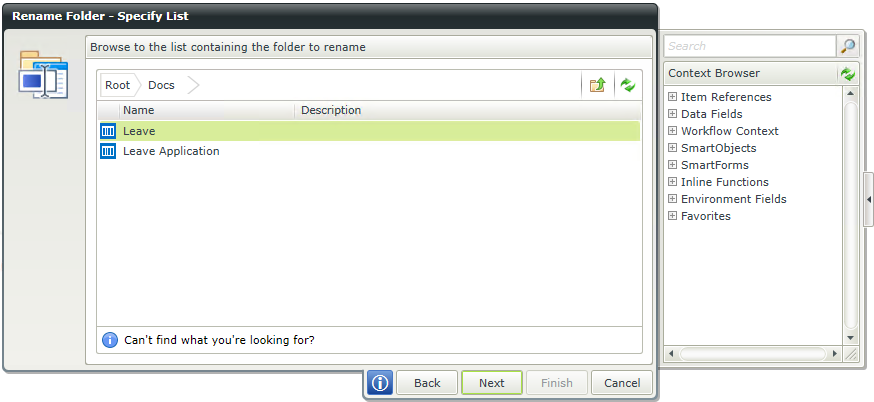
Select the SharePoint list of the folder that should be renamed.
| Field | Description | Sample Value |
|---|---|---|
| Site Collection Navigation | If the SharePoint Site Collection contains subsites, navigate to the required List by clicking the subsite. Select the required List and click Next to continue the wizard. |
Specify Name
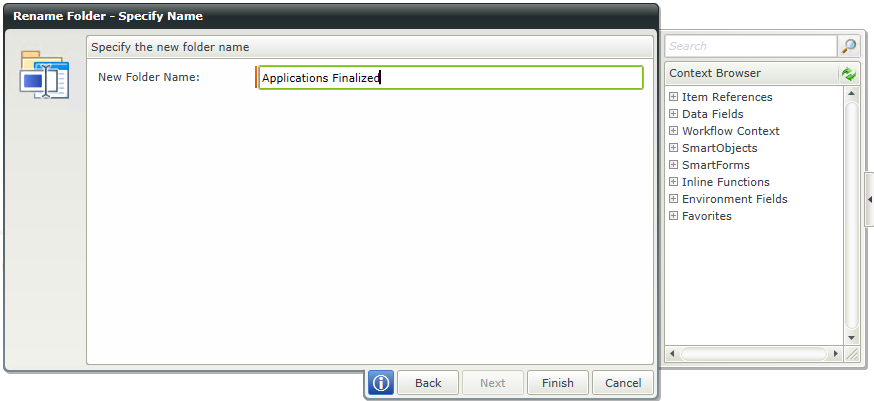
Type a value or drag a field from the Context Browser to set the new name of the folder.
| Field | Description | Sample Value |
|---|---|---|
| New Folder Name | The name the folder will change to | Type a value, or drag a value from the Context Browser such as a pre-configured Data Field, Item Reference or a SmartObject Load method. Note that when a SmartObject Load method is used, an input property is required for the correct data to load. |