K2 SmartObject Wizards - Custom SmartObject Wizard
 |
See the SmartObjects Overview for more information on K2 SmartObjects |
The SmartObject wizards allow the user to apply the available SmartObject methods within a K2 Designer for SharePoint Workflow. These methods are available in the tool bar as displayed below:

The methods available for each SmartObject depends on the SmartObject Access Configuration which is done on the K2 Site Settings page. The Customer SmartObject used as an example was created as a SharePoint List Item. The methods listed are methods created for the Customer List in SharePoint.
| Method | Description |
|---|---|
| Add Attachment | Adds an attachment to a record instance in the K2 SmartObject |
| Create | Creates a record instance in the K2 SmartObject |
| Delete | Deletes the record instance from the K2 SmartObject |
| Load | Loads a record from the K2 SmartObject |
| Update | Saves the record instance in the K2 SmartObject |
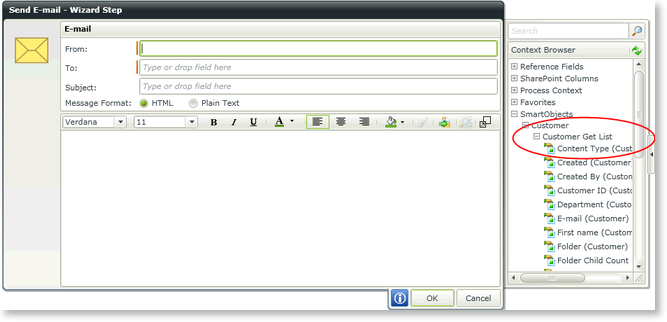
The List method is listed in the Object Browser:
Using a Custom SmartObject Wizard
Custom SmartObject wizards are dependent on the SmartObject method and will vary according to the method being used and the required properties/parameters.
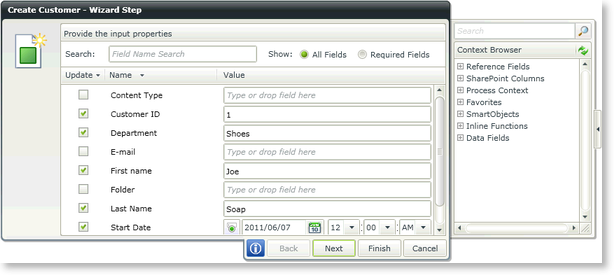
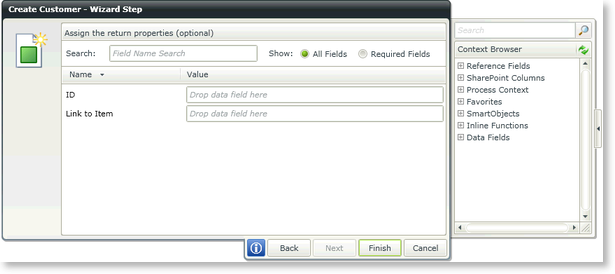
If we use the Create Customer method for example, the method contains Input Properties and Return Properties as shown below.
| Feature | Description |
|---|---|
| Search | Returns the properties/parameters according to the specified criteria. Type text to perform a search. The search will auto refresh, meaning while typing the search is already active and will return values as it finds it |
| Show | One can toggle between All Fields and Required Fields. When selecting Required Fields, only those fields that are required will be displayed |
| Update | Default values can be specified per property/parameter on the Configure SmartObject Access screen in K2 Site Settings. If these values should be updated with another value, tick the Update box and specify the new value or use the Context Browser to specify where the value should be obtained from |
| Value | This is the value that will be used to create the record instance in the K2 SmartObject with. Type text or use the Context Browser to specify where the value should be obtained from |
Method Parameters
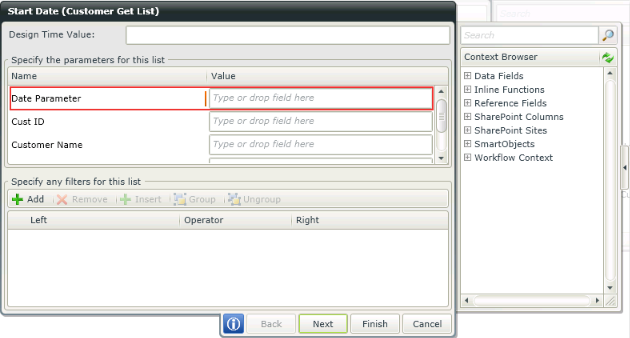
Method Parameters can be configured to be used as Input Mappings. This allows for dynamic data results to be returned. Parameters and Input Properties can be required or optional. They are grouped together in the User Interface and called Input Mappings. Parameters are listed first, then properties. Parameters are dependent on the Service Object it is mapped to.
Considerations
It is important to take note of the following when using Method Parameters and Filters :
- Using Input Mappings is critical if a large number of records exist in the backend system. The more records you can filter-out before the results are returned to K2 the better the performance will be.
- If items are filtered out of the result set that is expected by using parameters, the filters applied subsequently may not work properly. As a troubleshooting tip, supply Input Mappings only, look at the result set first, then go back and apply a filter to the result set that is returned.
