K2 for SharePoint - Retract a Solution (Advanced)
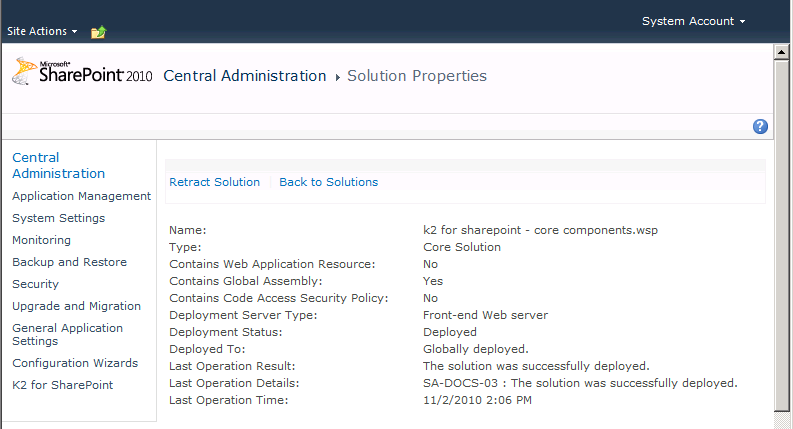
All the Solution Properties are displayed as displayed below, describing the solution and the particulars of where it was deployed, the location operational results and so on.
What to do ?
 |
Escape Action: To avoid retracting a solution click Back to Solutions |
||||||
 |
To retract the solution click Retract Solution |
||||||
 |
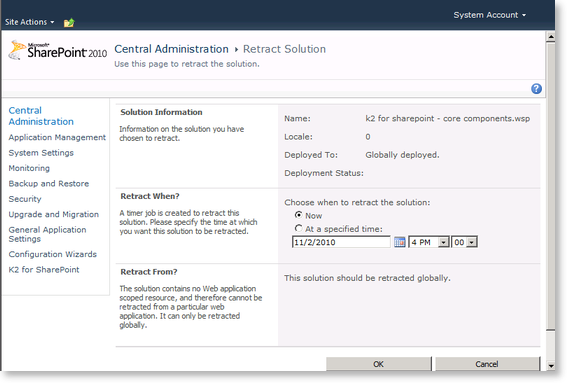
The next step enables the user to configure the Retract Solution properties From the Central Administration | Retract Solutions page the user is required to configure the following items:
|
||||||
 |
When ready, click Ok |
||||||
 |
The browser will navigate back to the solutions listing, where the information pertaining to the Solution Retract process will be displayed. 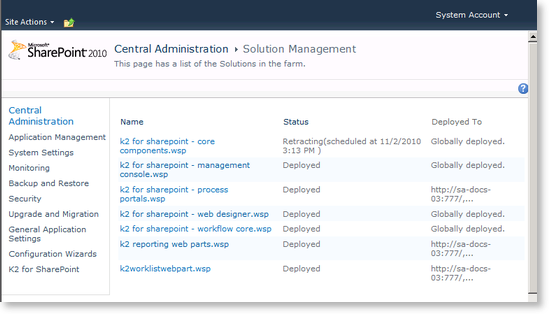 |
||||||
 |
During the Retraction process, the SharePoint Service may be unavailable momentarily. This is expected behavior, while the application pools are being cycled. To rectify this, refresh the browser until the SharePoint Central Administration page displays once more. |
