Create Document Wizard - Create Document
The Create Document wizard screen is displayed when the Create Document option is selected on the Event Name and Action screen. This provides the ability to create a document automatically.
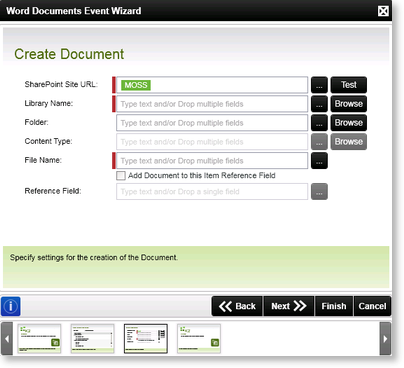
Fig. 1. Word Documents Event Wizard - Create Document
| Feature | What it is | How to use it |
|---|---|---|
| SharePoint Site URL | Represents the SharePoint Site where the Document Library can be located | Type the SharePoint Site URL or alternatively use the context browser to select the SharePoint Site URL |
| Library Name | Library Name where the document should be created | Type the Document Library or alternatively use the Browse button to select the Document Library from the SharePoint Site |
| Folder | Folder where the document should be created | Type the Folder Name or alternatively use the Browse button to select the required Folder |
| Content Type | The Content Type of the document | Type the Content Type or alternatively use the Browse button to select the Content Type |
| File Name | File Name of the document to be created | Type the File Name or alternatively use the context browser to select the File Name |
| Add Item to this Item Reference Field | Option to add the Item to this Item Reference Field | Tick this option if the Item is to be added to this Item Reference Field |
| Reference Field | Name of the Item Reference Field | Supply a name for the Item Reference Field |
