K2 Workflow Designer - Sharing a K2 Workflow Designer Workflow
The K2 Workflow Designer workflow first needs to be saved, before the Share option can be selected
Important Considerations:
When using the share functionality the following needs to noted:
- If a workflow is locked it can only be unlocked by the original designer of the workflow who shares the workflow
- It is not possible to edit the same workflow at the same time, only one user can work on a workflow at a time
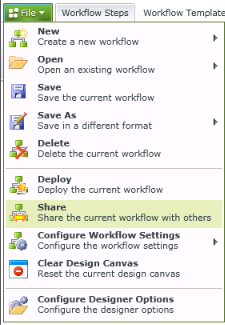
Fig. 1. Main Menu - Share Workflow
The following Sharing and Reuse Settings screen will display when selecting the Share function located on the File Menu.
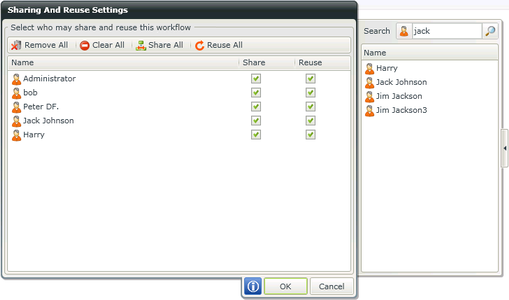
Fig. 2. Share Workflow
| Feature | What it is |
|---|---|
| Remove All | Removes all the displayed users from the list |
| Clear All | Clears all the selections made |
| Share All | Shares the workflow with all the displayed users from the list |
| Reuse All | Provides all the displayed users with permissions to reuse the list workflow |
| Search | Searches for specific AD Users |