Create a multi-step
You must drag steps onto the canvas one by one, but you have the option to group steps together. This is referred to as creating a multi-step. A multi-step consists out of several individual steps grouped together to create a single step.
A multi-step allows you to save space on the canvas and bundle steps that logically go together, such as when multiple steps comprise a single, logical step of the workflow.
-
The key difference between workflow groups and multi-steps is how they organize and execute workflow steps. Groups can contain any steps in a workflow and execute those steps non-sequentially, depending on the workflow logic. Multi-steps execute their steps sequentially from top to bottom at runtime, with each step running one after the other. Multi-steps cannot include steps such as decisions, loops, and Call Sub Workflow.
- Not all of the steps can be grouped together to create a multi-step. For more information see the Considerations section located on each of the step topics. For example, you cannot have two Task steps in a multi-step.
 Create a multi-step
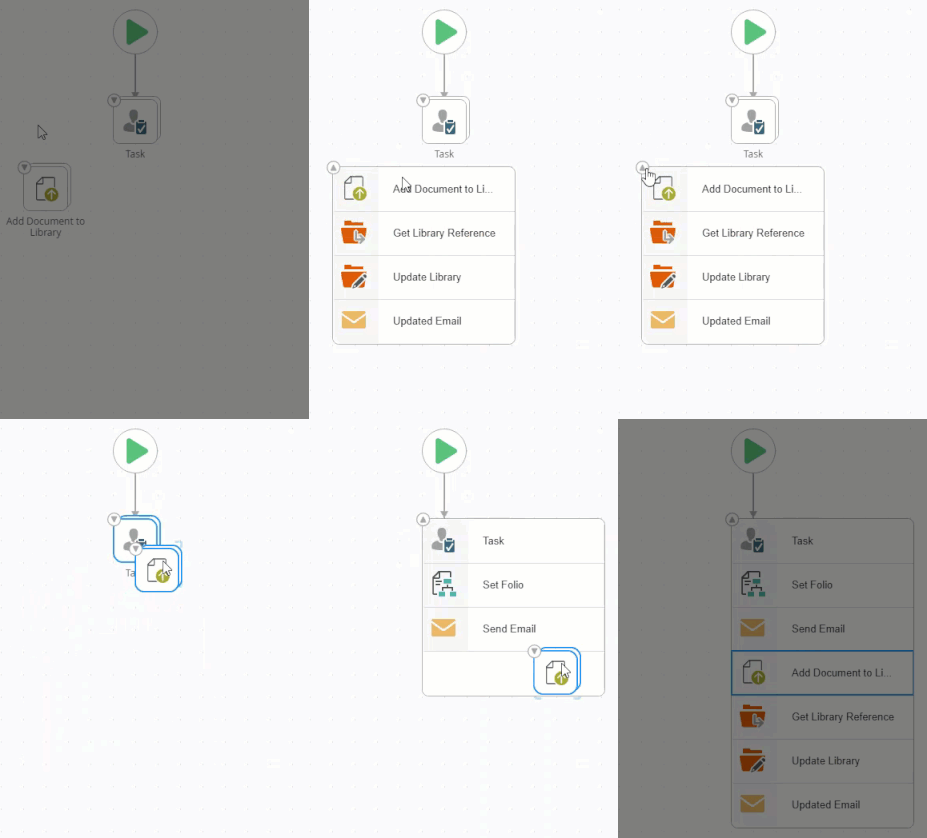
- Select a step from the Toolbar and drag it on top of another step.
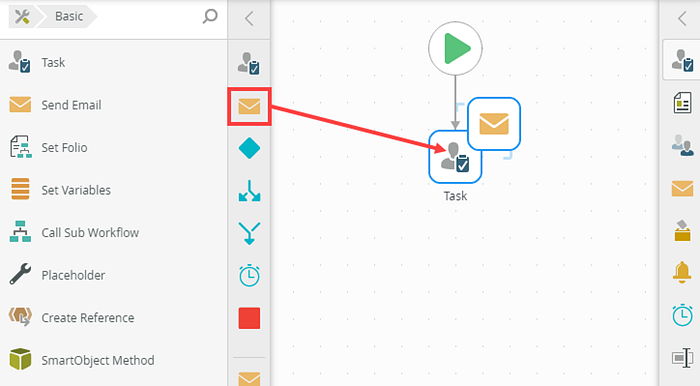
- When you do this, the steps appear stacked as shown here:
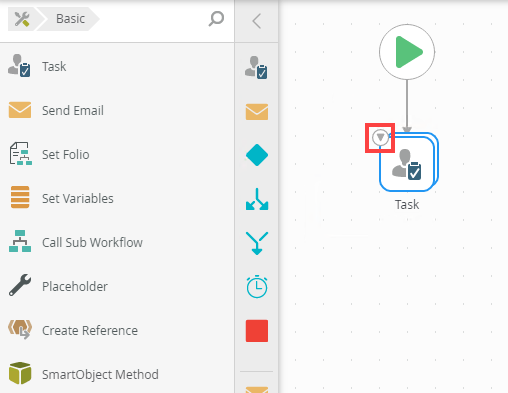
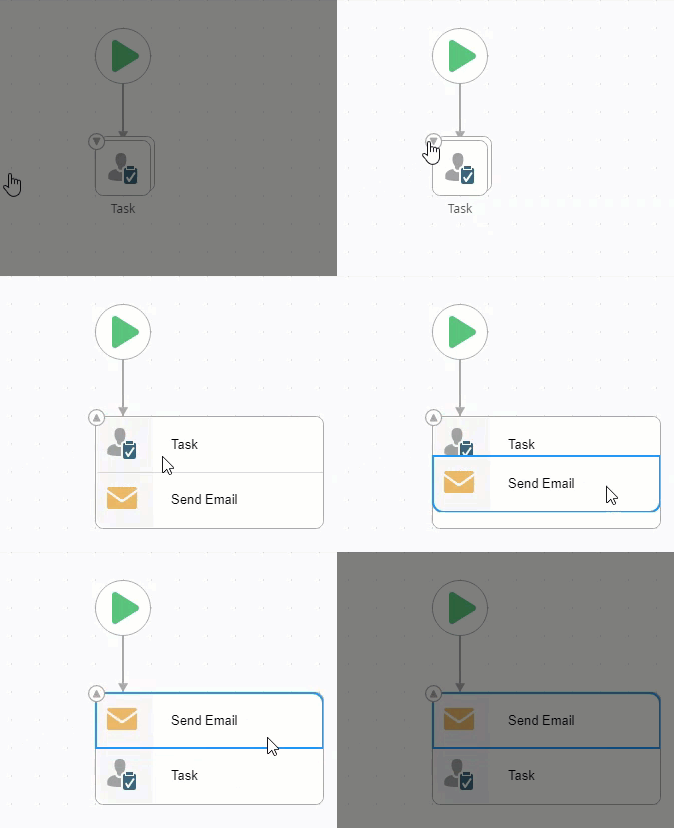
- To expand the multi-step, click the down-arrow or double click it.
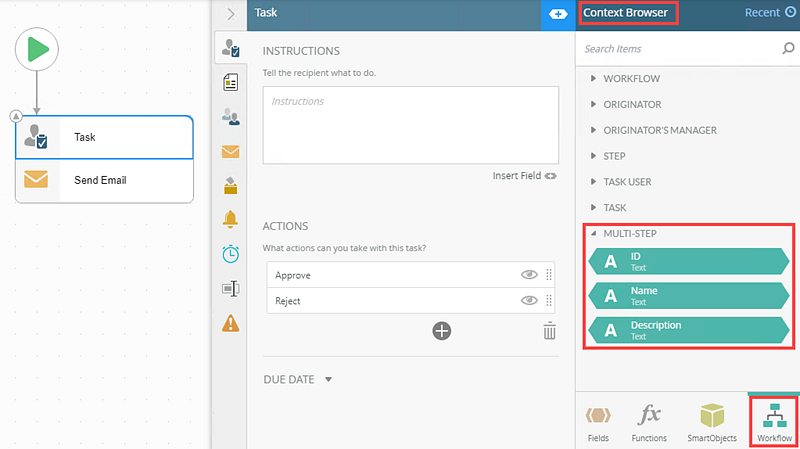
When you create a multi-step related workflow objects show in the multi-step section in the Context Browser.
- To change the multi-step order, select and drag the step into position.
- To add another step to the multi-step, click and drag it from the toolbox, favorites bar, or from another area on the canvas onto the multi-step.
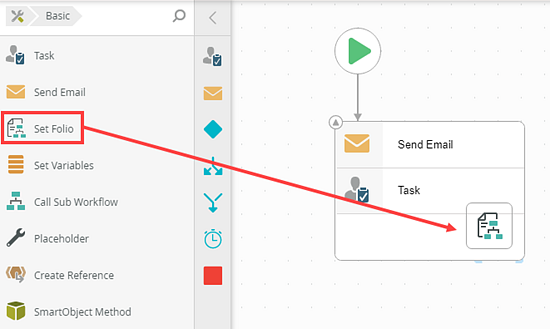
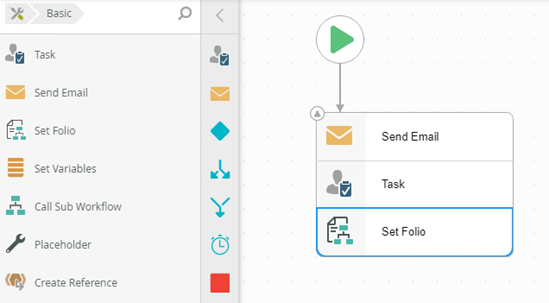
- The third step is added to the bottom of the existing multi-step:
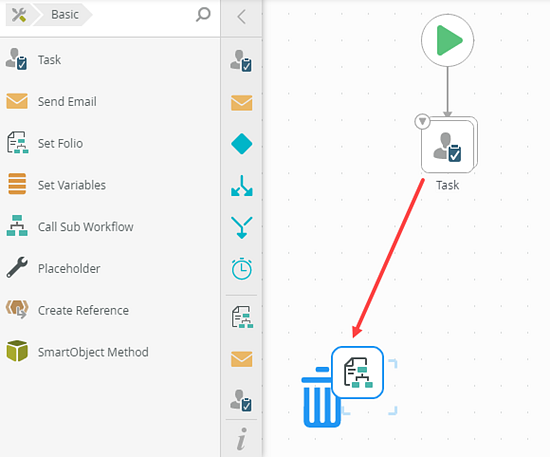
- To remove a step from a multi-step, click and drag it to the Trash bin.
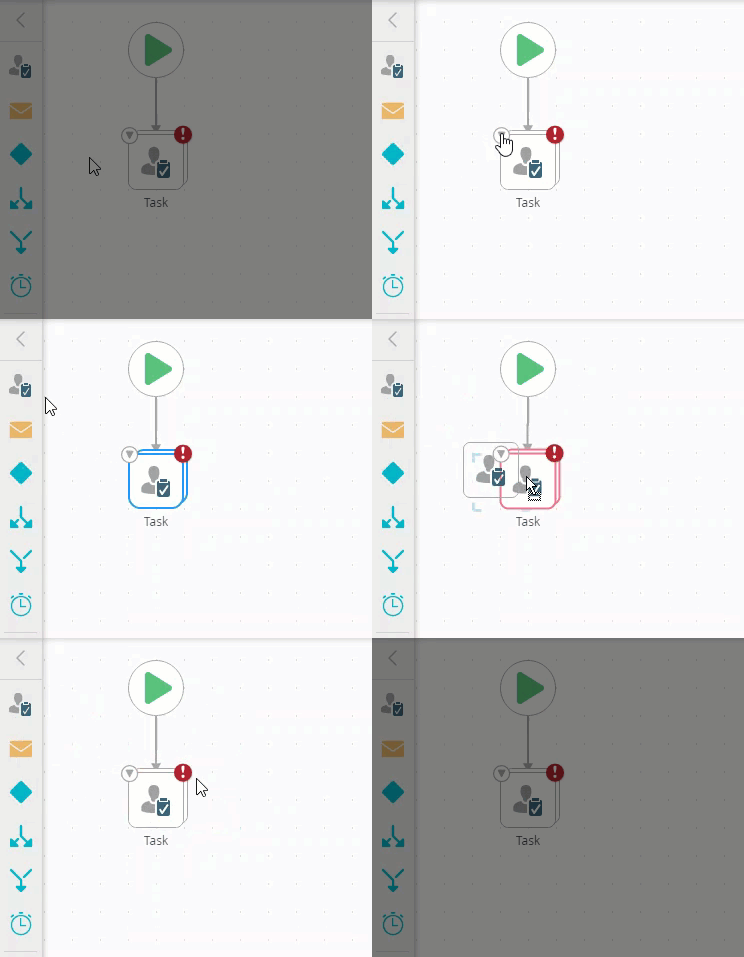
- Some steps cannot be grouped into a multi-step. The designer warns you with a decline border (step outline changes from gray to red) when you drag one of these steps onto the multi-step. For example, you can only have one Task step within a multi-step.
Add a multi-step into a multi-step
- To add a multi-step within another multi-step, select and drag it onto the multi-step.
- The multi-step you are dragging into expands. Select the position and drop the multi-step.
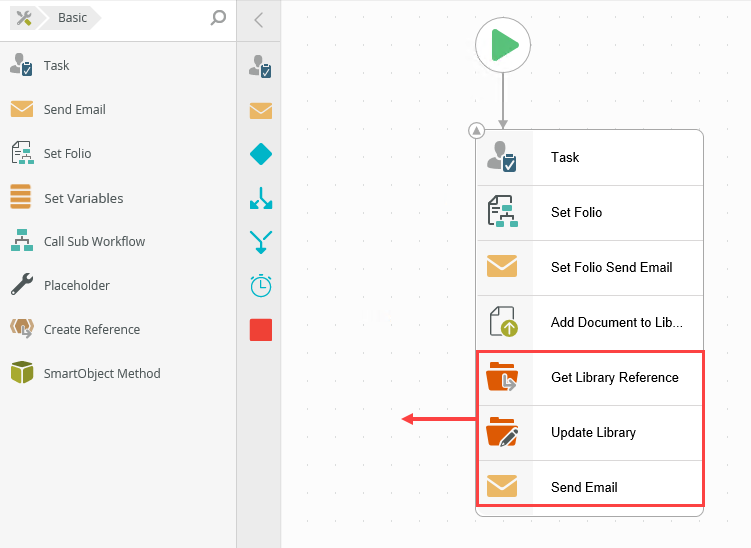
Remove multiple items from a multi-step
- To remove items from a multi-step, click the down arrow to expand the multi-step.
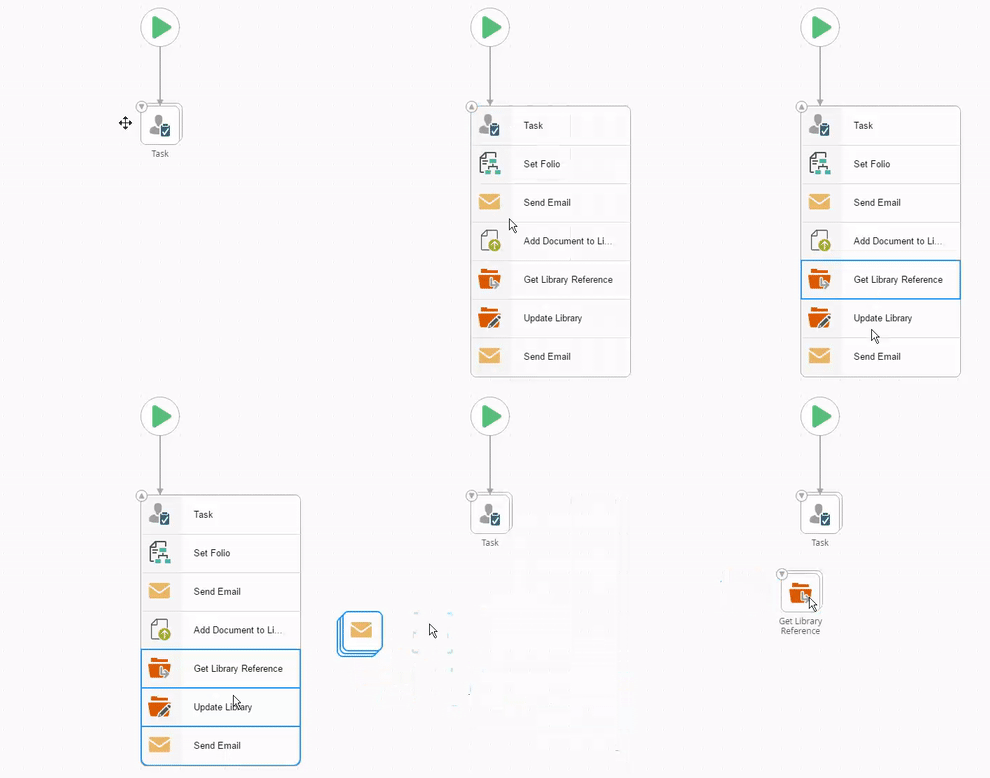
- Select the steps, and then click and drag them out of the multi-step, to a blank area on the canvas.
Multi-step at Runtime
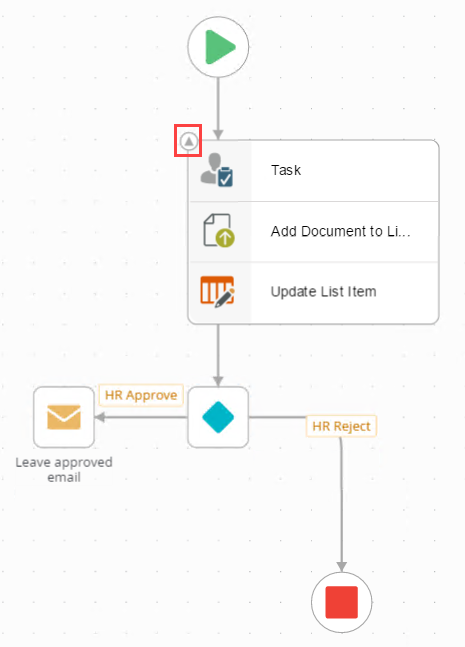
At runtime, steps within a multi-step execute sequentially from top to bottom, one after the other. If you have a mix of a user task and server events, such as SmartObject Method or Send Email steps, steps after the user task may execute multiple times. By default, a server event executes based on the number of recipients of the task. This means that if you place the Task step at the top of the multi-step, before the server events, if the task is sent to multiple recipients, your server events execute multiple times based on the number of recipients. Placing your Task step at the bottom of the multi-step after server events, means that the server events execute at the same time. In some cases you may need server events to execute per recipient or once for the multi-step. The order of events in the multi-step controls how many times server events execute. For a detailed scenario, see Scenario: 2 Recipients, 2 Approvals where Task step is part of a multi-step containing 2 server events.
In this example: the Task step executes, then the Add Document to Library step and finally the Update List Item step.
Considerations
When working with multi-steps keep in mind the following considerations:
- Additional slots may cause multi-step events to execute events multiple times that occur after the task event.
- Not all of the steps can be grouped together to create a multi-step. For more information see the Considerations section located on each of the step topics. For example, you cannot have two Task steps in a multi-step.
- When you add a Create Reference and Task step in the same multi-step and then use the email reference (created from a SmartObject in the Create Reference step) as the destination email (assigned recipient) in the Task step, the following runtime error occurs “An Activity with a client event should at least have one destination”. At runtime the destination is set at activity level and having the Create Reference step in the same multi-step as the task prevents the destination reference from executing it as it should. Rather drag the Create Reference step out of the multi-step so this can execute before the Task step.
- When creating a multi-step, the first selected step is the main icon displayed in the multi-step stack. If you include a Task step in the multi-step, the main icon is always the Task step icon so that you know, at a glance, that there is a user action in the step.
- When multiple steps are selected, the source selection (one selected first) is the main icon displayed in the multi-step stack.
- At runtime, steps within a multi-step execute sequentially from top to bottom, one after the other. If you have a mix of a user task and server events, such as SmartObject Method or Send Email steps, steps after the user task may execute multiple times. By default, a server event executes based on the number of recipients of the task. This means that if you place the Task step at the top of the multi-step, before the server events, if the task is sent to multiple recipients, your server events execute multiple times based on the number of recipients. Placing your Task step at the bottom of the multi-step after server events, means that the server events execute at the same time. In some cases you may need server events to execute per recipient or once for the multi-step. The order of events in the multi-step controls how many times server events execute. For a detailed scenario, see Scenario: 2 Recipients, 2 Approvals where Task step is part of a multi-step containing 2 server events.