Architecture
Solution Studio is a Nintex App created to build complex solutions on the Nintex platform. It includes:
-
Solutions that pull together Nintex Apps, Workflow, DocGen, and eSign components to give a solution builder a single view for building solutions
-
A framework for defining the underlying processes (flows) that power the solution & solution settings
-
Reusable Feature packs for common process steps (such as generate a document; sign a document; review step; stub stage) with pre-built workflows and forms
-
Easy ways to stub out & prototype a solution; then the builder can go deeper into workflows, middleware, and Apps to further customize and polish the solution
-
Admin user and external user portal apps for each solution
-
Some wizardry to make solution building a bit easier for you
 Architecture diagrams
The following diagram outlines how Solution Studio is built:
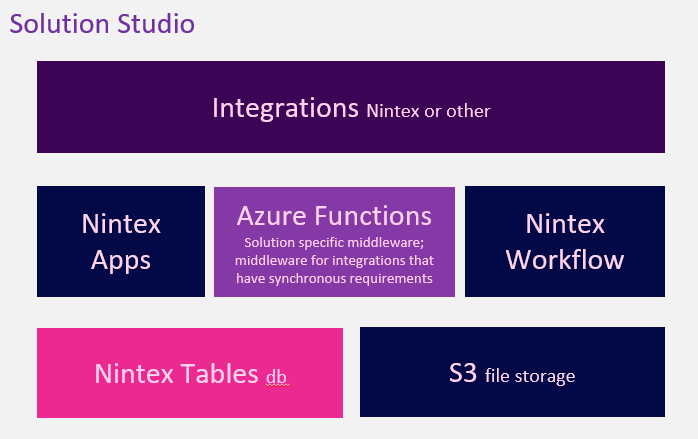
The integrations component is where a solution plugs into a 3rd party integration or extensions from Nintex Workflow or another Nintex application, like Nintex DocGen® for Salesforce or Nintex eSign. The Core middle layer shows how Nintex Apps and Nintex Workflow work together through Azure functions to create the solution. The Azure Functions component essentially acts as as a lightweight middleware layer to handle data transformation tasks such as JSON serialization/deserialization, conversion between JSON and XML formats, and other content-type adaptations. In terms of the other components, Apps provides the UX capabilities, Workflows provides the orchestration capabilities, Tables provides the data later, and S3 storage currently provides the content management capabilities.
The following diagram outlines how a solution runs:
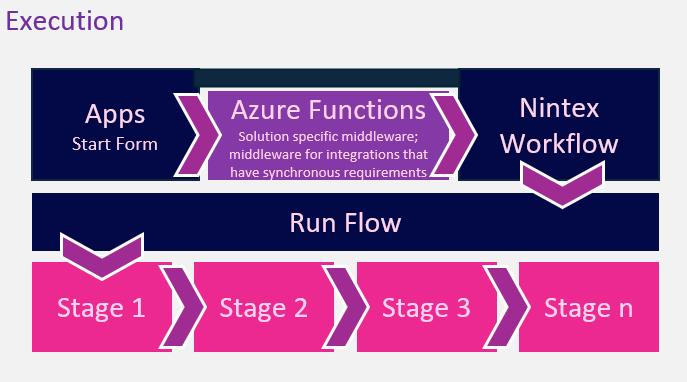
The solution starts with a form integrated with a workflow that progresses through the configured stages.
Nintex Tables - the data layer
Nintex Data is a centralized and scalable data platform built and designed for automation. It seamlessly integrates with the Nintex Workflow platform, allowing you to store and manage your process-related data in tables. Each table serves as a way to securely store and manage data, making it easier to reference and retrieve information efficiently. Solution Studio uses orchestration tables supporting the solution apps:
-
Solutions: A solution is a grouping of related flows/processes for an entity. E.g, Vendor Management
-
Flows: describe the process. E.g, Vendor Onboarding
-
Stages: A flow can have multiple stages or phases. E.g, Approval Stage
-
Components : Components assign configuration form or task form to a stage. A stage can have multiple components.
-
Instances: an execution of a process/flow.
-
Orchestration Log: Audit table to log how an instance enters and exits an orchestration stage.
-
Action Log: Audit table to log actions that occur during a stage.
Nintex Apps - the UI layer
Nintex Apps is a cloud-based, user-experience platform that enables users to create applications that connect with data repositories and services. Solution Studio apps and pages are the UI layer or front-end layer of the solution. These pages display data and provide interactions for the orchestration tables from the data layer.
Apps included with Solution Studio are
-
Solution Studio
-
Admin
-
Portal
These are complete applications that let you design, configure, and run your orchestration flows start to finish, providing a great starting point for business solutions.
Reusable Component Pages
These three component pages can be included in your business application pages if applicable
-
Shared_Component_Instances: List of instances. Can be modified to filter data by Solution, Flow, or Submitter
-
Shared_Component_Tasks: List of tasks filtered by Solution and assigned to current user.
-
Shared_Component_Instance_Detail: Detailed view of an instance and its progress. This page shows instance's Status Log, Submitted Info, Current Info, Task Form if applicable.
For example, you can have an Application List or Dashboard page and include the Shared_Component_Instance_Detail page in the detail modal for each Application to show the approval process.
Forms
Forms are a set of pages created specifically for form building purposes. In Solution Studio, there are three sets of forms:
-
Start Form: Collect instance (business) data. When the form is filled out, it can be either saved as draft or submitted to start the process.
-
Config Form: Site admins using the Admin app will fill out this form to send configuration data to the workflows or task form.
-
Action Form: Site admins or end users will use this form to complete tasks and log data (like notes) during the process. For example: an inspection review form, or a payment form.
Behind these forms are principal - dependent pages. The logic that handles saving and reading form data in the principal page, while the dependent page is reserved for form building.
A site admin can work on the form. We recommend that only a solution builder make changes to the principal page for use cases like:
-
Provide picklist sources for form fields
-
Add business data to form
-
Make changes to action flows (like submit instance or complete task)