Modify an Installation
Once you have your environment up and running, you may need to modify components or change configuration settings. Re-run the Setup Manager to add or remove components, or to change configuration settings.
- After installing a Cumulative Update (CU) or Fix Pack (FP), any time you use the Reconfigure, Update, or Modify option in the Setup Manager to make changes to your installation, you must reinstall the same or latest CU and FP.
- If you use the Configure option and update the license only, you do not need to reapply the existing fix pack. For example, if you are on version Nintex Automation K2 (5.9) FP03 and you update the license, the existing fix pack remains in place and unchanged.
- If you have installed the Nintex K2 Five (5.5) November 2021 CU, and you use the Update option, the current installation's system files revert to the original versions and the Setup Manager may cause an error. For more information see the section Version Conflict warning.
 How to Modify components
If, after the initial installation of the product, you need to add additional components to an existing server, rerunning the Setup Manager will allow you to add them. The Modify option allows you to selectively add and remove components. If you add components using this option, it will run the configuration automatically after installing.
You can install and remove different components during the same session of Modify. For example, you can select to uninstall a component while at the same time installing a different component. After that it will automatically run the Configuration option for the components.
Add / Modify Components
Before adding a new component, evaluate your environment and make sure that the target server is a good fit for your requirements. Then, determine if all the prerequisites are met, and run the Setup Manager to add and configure the new components.
Steps:
- Be sure to save all your work and close the designers before continuing.
- Ensure that all related processes, such as the Server service, are shut down.
- Run the Setup Manager and select the Modify option.
- Select components to add (by checking the check box next to the listed component) or remove existing components (by unchecking the check box next to an installed component).
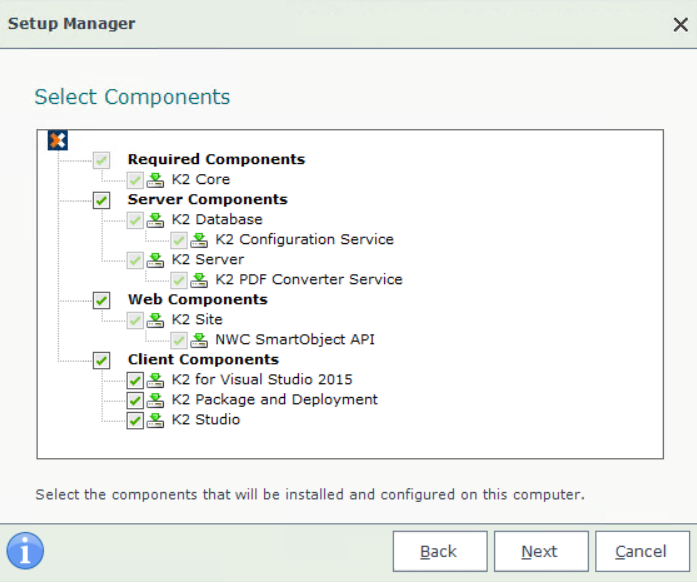
Any components with Check Dependencies actions will be indicated. First fix the dependency before you continue. - Click Next.
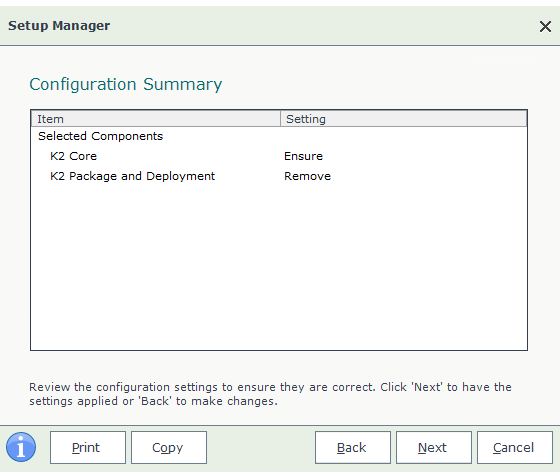
- Review the Configuration Summary screen.
- Click Next.
- Any Additional Actionsare listed. Click Next to start the Modify process.
- Once complete, the Configuration Analysis will run, click Next when it has finished.
- Click Finish on the Finished page.
 Considerations
- If you want to install one of the components on this server that have a Check Dependencies action, cancel the installation and fix the dependency. Then restart the installation and select that component.
- A reboot is required when selecting to remove a single server component.
- After selecting Modify from the initial screen, you can only select components to add if you open the Setup Manager from the "%PROGRAMFILES%\K2\Setup" installation folder (by checking the check box next to the listed component), or by removing an existing component (by unchecking the check box next to an installed component).
- Be sure to clear the browser cache after adding components.