SCIM integration with an Identity Provider: Manual/Custom approach

This topic discusses integrating the product with an Identify Provider (IdP), using your own code to integrate the IdP with the product via SCIM. This approach may be required when there is no specific app or extension available for the SCIM 2.0-compatible IdP that you want to integrate with, or if you want to build your own custom app or service to synchronize identities from your IdP with the product, perhaps because your organization requires only certain identities to be synchronized with the product via SCIM.

To authenticate against your environment's SCIM endpoint so that you can call SCIM operations, you can use Basic or OAuth. Similar to the OData and WFRest API's. For Basic Auth, you can base64 encode the username and password as per normal Basic Auth practices and add it as an Authorization header to the request. For OAuth, you can get an Access token similar to the OData and WF Rest API by using the K2 Api permission, and send that as a bearer token on the request.

Once your code has successfully authenticated against your environment's SCIM URI, you can call the various SCIM Endpoints to perform operations such as adding new users or updating existing users. See the SCIM API Reference topic for documentation on the various endpoints that are available to you. You will need to pass in the provider instance id value of the configured provider instance. Note that the Provider Instance ID and the URL will be unique for each IdP and each domain within the IdP that you are integrating with the product.

OAuth Refresh token expiry

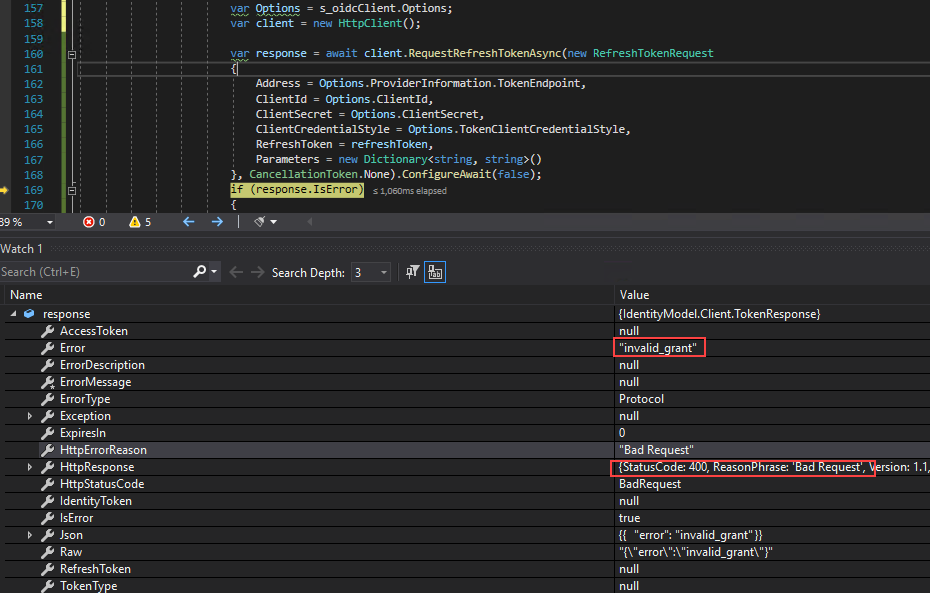
Standard OAuth operation is that your access token expires in a given time, usually 60 minutes, and your refresh token allows you to get a new access token. By default, the refresh token expires every 30 days. If you have a custom SCIM implementation, like described in this topic, it stops working when the refresh token expires and you get an error message.

Here you can see an HTTP response 400, Bad Request with the invalid_grant message when you call the RequestRefreshTokenAsync directly from an HttpClient:
To get a valid token, sign in again to perform the consent flow so that your token issuer can issue you a new refresh token.