Manage RPA Server with System Manager
The System Manager provides tools to monitor and manage the RPA server for machine-level services like RabbitMQ, Redis, and Seq. This feature allows you to:
- Perform RPA server upgrades and repairs directly from System Manager
-
View statuses of services and allow you to start and stop them
Accessing the System Manager
-
Click the System Manager icon to open it.
-
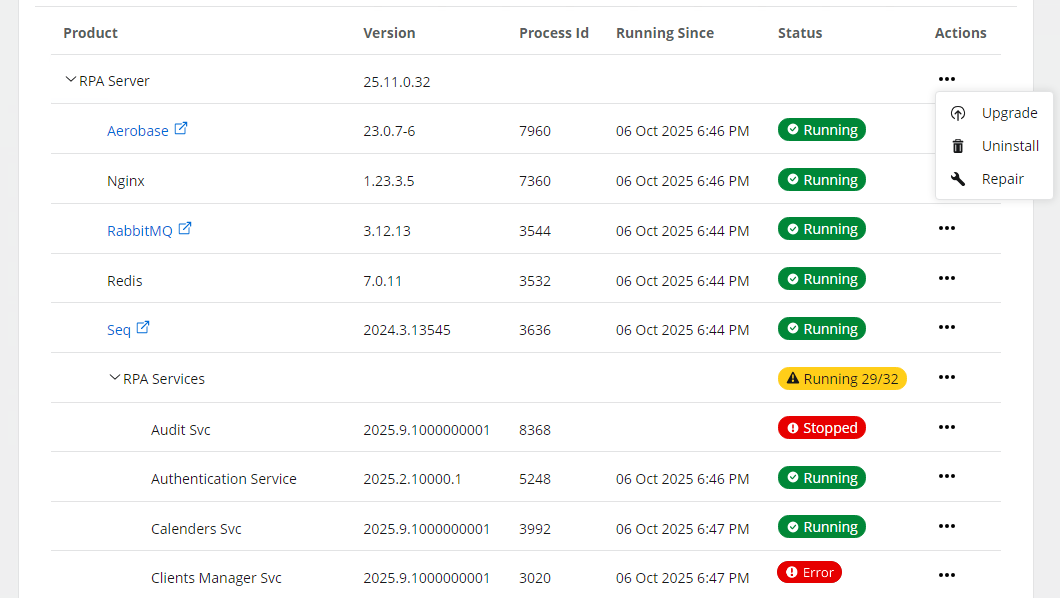
The main dashboard is displayed. This page lists the installed products and services along with their version, process ID, running time, status, and available actions.
 Badge statuses
Badge statuses help you quickly understand the health and status of products, groups, and individual services within the System Manager. The following describes what they mean:
| Status Type | Description | Possible Statuses |
|---|---|---|
| Product status | Shows the overall health of the product. | Error: Indicates an issue with installation or uninstallation. Consider opening a support case. |
| Group status | Displays the general status for all services within a group. |
All running: All services in the group are operating correctly.
|
| Service status | Shows the status of individual services. | Running: The service is active and functioning as expected.
Stopped: The service is not running. |
Manage the RPA server and services
In the Actions column, each product and service has a menu represented by 3 horizontal dots. Clicking these dots opens a menu with options specific to each item, providing quick access to essential actions for managing the server and services directly within the System Manager.
Server controls
Manage server actions as follows:
| Service Type | Action | Description |
|---|---|---|
| RPA server actions | Upgrade |
Start the upgrade process to a newer version. |
| Uninstall | Remove the RPA Server from your system. | |
| Repair |
Change existing RPA Server configurations without upgrading to a higher version. |
Service controls
Manage services as follows:
| Service Type | Action | Description |
|---|---|---|
| Individual service actions | Start service | Start a service that is currently stopped. |
| Stop service |
Stop a running service. |
|
| Restart service | Restart a running service. |
Suggested actions based on statuses
You can do the following based on the RPA server and service statuses:
| Badge Status | Description | Suggested Actions |
|---|---|---|
| Running | The service or group is active and functioning as expected. | No action needed. |
| Stopped | The service or group is currently not running. |
|
| Error | There is an issue with the installation, upgrade, or configuration of the product or service. |
|