Nintex Assistant attended automation
Nintex Assistant is a lightweight client installed on a user's machine that's connected to the Nintex RPA Server. It is an attended automation which is similar to a virtual assistant, requiring human intervention. It remains silent and disabled until it is triggered by a user, or a predefined action.
When installing the Nintex RPA Server, you can select the automation type in the Deployment type field in the General settings section of the Configurations page.
Configure Nintex Assistant
If you selected Unattended Automation during deployment, or if you just want to switch the automation mode, you can do so through the configuration files instead of running the installation again.
To manually enable the Nintex Assistant attended mode:
-
Find the Config file in
C:\Program Files\Nintex RPA Robot\<version>\Config. -
Open
appSettings.configin a text editor. -
Find the line that reads:
<add key="RunAutomationEnabled" value="True" />, and change the value toFalse-
The line should now read:
<add key="RunAutomationEnabled" value="False" />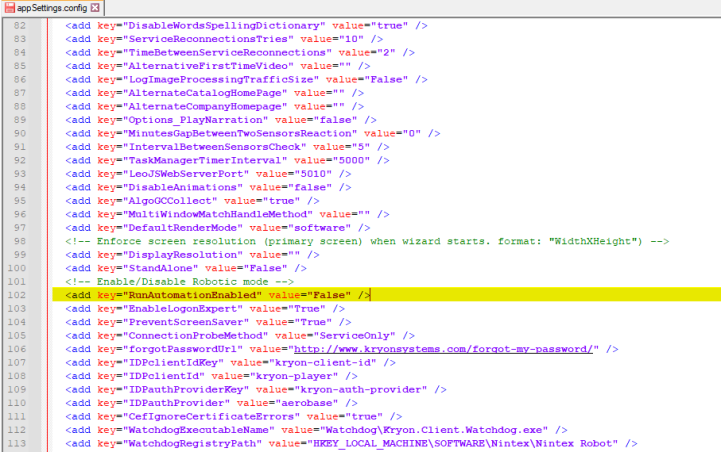
-
-
Save the changes. The robot now opens as Nintex Assistant.