Testing a Nintex RPA solution
Before deploying an RPA solution, it is important to invest time in testing the performance.
By testing outside of the production environment, you can:
-
Ensure that all business requirements are met.
-
Verify the reliability, performance, and limitations of the wizards in applications.
-
Identify business and technical exceptions.
-
Prevent unexpected behavior and reduce future maintenance work.
Planning and testing for an unhappy path, or edge cases provides stability and resilience in the happy path.
Testing frameworks
 Component testing
Executed by an RPA developer.
-
Visual authentication of a step during development.
For example, ensure that the wizard connects to the appropriate application.
-
Test the specific feature against specifications.
For example, try the valid and invalid credentials to see how it reacts.
System integration testing (SIT)
Executed by an RPA developer.
-
After development is complete, replicate the production environment as closely as possible.
For example, check that the screen resolution is the same in the testing and production environments.
-
Test how the feature interacts with the rest of the processes.
For example, test more complex exceptions and fallbacks and ensure that the solution is stable for production.
User acceptance testing (UAT)
Occurs after SIT is complete.
-
Test the process from end to end.
For example, verify that the solution delivers the expected results.
-
Involve the business user or process owner with the RPA developer during testing.
For example, have the business user/process owner test the solution to evaluate how it affects ROI or business needs.
-
The business user or process owner signs off on the UAT before the solution moves to production status.
It is important to implement a gradual rollout to production to ensure that all risk perspectives are identified and addressed. Some wizards involve sensitive data and applications; testing helps ensure that the solution meets security protocols. When you are more confident with your solution, you can do a smaller UAT in the production environment and then roll it out on a bigger scale, with more robots or to cover more use cases.
How to set up the right test environment
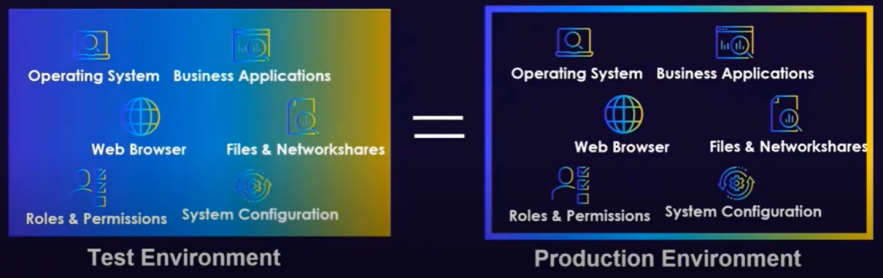
The test environment should be identical to the production environment to demonstrate the real conditions of your deployment.
Attended automation testing vs. unattended automation testing
- Unattended automation: Robots are installed on a virtual machine, and they run wizards with no human intervention.
- Duplicate the robot environment and configurations.
-
Attended automation (Nintex Assistant): Robots are installed on an end-user desktop and they run wizards on the user’s applications.
-
Front-end testing is recommended.
For example, select and engage with a group of users early in the development process to take their design needs into account.
-
Users' initial feedback is important.
For example, if you have call centers in different locations, bring in a diverse group for A/B testing. This enables you to incorporate cultural and behavioral differences (how users execute their processes) in your solution.
-
Extensive UAT.
-
With a gradual rollout from smaller testing teams to larger ones.
-
Test accessibility and inclusivity of the design.
Ensure that the solution can work with all target groups, including those with disabilities and impairments.
-
In addition to user feedback, you can use logs from Nintex RPA Studio to measure impact and stability.
-
-
Continuous optimization.
-
Open a platform for continuous user feedback.
-
-
Use Nintex RPA Studio to support your testing framework
Nintex RPA Studio has practical tests embedded as features to help support your testing framework.
By using Nintex RPA Studio you can do the following:
| Embedded tests | Details |
|---|---|
| Check the output in a business application | If the output is an Excel file, you can compare the testing output with the expected output and see if there are discrepancies. |
| Implement checkpoints with message boxes and View variable list to better evaluate complex logic | You can use the View variable list during component testing and system integration testing for more complex wizards to ensure the correct output. |
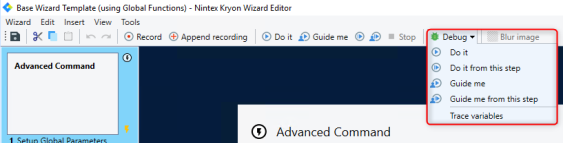
| Use the Debug mode in Nintex RPA Studio to do component testing |
You can debug with Do it or Do it from this step, to check the steps of the wizard. Open the wizard from the Wizard Catalog in Nintex RPA Studio and select Debug:
|
| Evaluate log files (Debug log) |
Debug log files can be found inside the wizard editor by selecting Wizard from the menu, and View debug trace.
|
| Examine successful vs. unsuccessful run |
It is critical to define the criteria on what is considered a successful or unsuccessful run during the solution design stage. For example, it can be successful from a technical perspective, such as a wizard performing as expected, but fail from a business perspective, leading to an unsuccessful outcome. |

For more information about the importance of testing outside of the production environment, review the following training material from Nintex Academy: Creating an automation testing plan.