Create email triggers
An email trigger initiates a new task whenever an email message matching a specified filter is received.
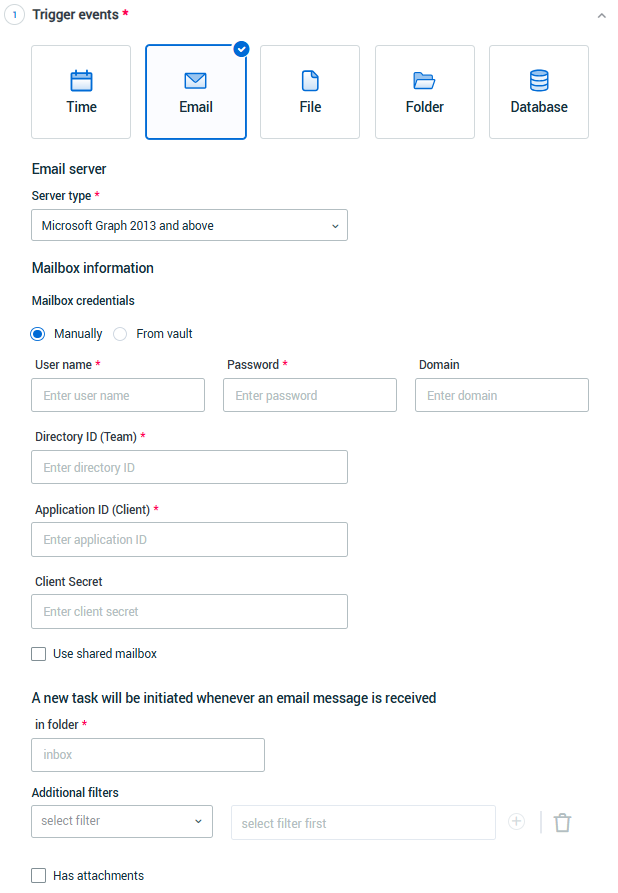
 To create an email trigger
-
Enter the settings required to access the incoming email server and account.
-
Enter mailbox credentials:
To select a credential from the credentials vault, select From vault. Select a credential from the list.
Working with Microsoft Office 365 new authentication method?
You can set the Application ID and Tenant/Object ID directly into the Credentials Vault settings in the Nintex Admin.
Read more about Working with Microsoft 365 Exchange and Modern Authentication
To add credentials manually, select Manually. Enter the User name, the Password, and the Domain.
For Microsoft Office 365 new authentication method, insert the Tenant ID and Application ID of the Microsoft Exchange (retrieved from Microsoft Azure > Email application ).
-
Directory ID (Object ID) is sensitive information and is encrypted.
-
Application ID is not sensitive information and is not encrypted.
-
Once IDs are entered, they cannot be removed - only edited. To remove the IDs, you need to delete the trigger and re-create it.
Read more about Working with Microsoft 365 Exchange and Modern Authentication
-
-
(Optional) If the mailbox is shared, select Use shared mailbox and enter the shared mailbox name.
-
(Required) Enter the folder name of the folder that is monitored for incoming mail messages in in folder field.
NOTE: This is the folder on the email server that will be monitored for messages matching the other email filter requirements. Generally, the name of this folder is
Inbox(or a translation ofInbox), but it can vary based on email server/account configuration. -
Set additional filters for the messages to be monitored:
-
(Optional) From: The email address from which the message must be sent.
-
(Optional) To: The email address to which the message must be sent.
-
(Optional) Subject contains: A word or a phrase that the subject of the message must contain.
-
(Optional) Body contains: A word or a phrase that the body of the message must contain.
-
-
(Optional)Has attachments:
-
When this box is selected, a message must include attachments in order to cause the trigger to initiate a new task.
-
If not selected, any message matching the other filter requirements (whether or not it includes attachments) will cause the trigger to initiate a new task.
-