Copy a File
Copy a file from its current location to a destination of your choice.
This Advanced Command supports copying to the same platform only. For example, you can only copy a file from a location in your local machine to another location in your local machine. Copying files to another platform (such as from local machine to SharePoint) is not supported.
When adding a 'Copy a file' command, you have the option to select either the Local File System or SharePoint Online as the file storage location.
 Copy a file from Local File System
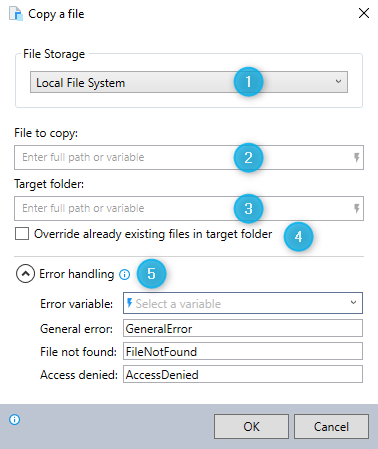
-
Select Local File System as your file storage location.
-
Enter the full file path and file name of the file you wish to copy.
-
Enter the full path of the folder where you want to copy the file to.
-
Indicate whether you want to overwrite any existing file with the same name in this location.
-
Expand the Error handling option to provide instructions to the wizard on how to manage encountered errors. For more information on error handling, see Error handling.
Copy a file from SharePoint Online
You can copy a file stored in your SharePoint Online.
You are advised to use the full path of the document when specifying the location of the SharePoint file (e.g. https://mycompany.sharepoint.com/sites/myDocs/Shared%20Documents/RPA%20info.txt). The shortened link obtained when using the "share link" option (e.g. https://mycompany.sharepoint.com/:t:/s/myDocs/IQDUHp2bRrgbRq-yuzYFnmEfAWqoTUXNb8G0a5DgJ9PTrnY?e=sw3vtJ) is not supported.
See here for other details about SharePoint Online.