Logical
Logical functions performs a logical operation or comparison on objects and expressions, and return a Boolean value.
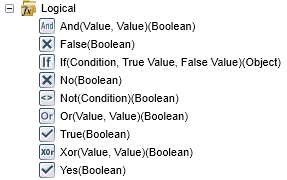
An item is selected and then added to the canvas or K2 field part by clicking the Add button or by dragging it to the right place.
| Functions | Description | Example |
|---|---|---|
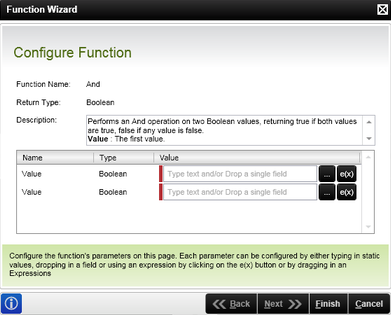
| And | Performs an And operation on two Boolean values, returning true if both values are true, false if any value is false. | Input Value: True Input Value: False Result: False |
| False | Gets the Boolean value of false. | Result: False |
| If | Returns one of two values (Boolean condition, True, False) based on a Boolean condition. Nested expressions of 7 or less are allowed. | Condition: True True Value: "Test string 1" False Value: "Test string 2" Result: "Test string 1" |
| No | Gets the Boolean value of false. | Result: False |
| Not |
The Not function changes false to true and true to false. Returns a true value if the condition evaluates to false and a false value if the condition evaluates to true. |
Condition: True Result: False |
| Or | Performs an Or operation on two Boolean values, returning true if one of the values is true, false if both values are false. | Value: True Value: False Result: True |
| True | Gets the Boolean value of true. | Result: True |
| Xor | Performs an Exclusive Or operation on two Boolean values, returning true if one and only one of the values is true. | Value: True Value: True Result: False |
| Yes | Gets the Boolean value of true. | Result: True |
The true and false value inputs need to return values of the same type. For example, dragging a SmartBox SmartObject delete method into a true value is allowed by the If’s input wizard at design time, however it will not work at runtime because the delete method does not return a value.
The Function wizard content varies according to the selected function: