Publishing Service Objects
When the service object is finished and ready to be exposed as a SmartObject, it needs to be published to a location where the service object can be run against the SAP BAPIs to execute the service methods. When the service object is published, it is published to the connect Application server which hosts the service object. The person who created the service object and any other developers will be able to access the service objects from the Default Service object repository. Publishing the Service Object exposes the methods that were created as service object methods in K2 blackpearl and makes them available via the K2 connect service broker. This enables developers to create a SmartObject based on the Service Object. The SmartObject acts as an intermediary layer of sorts between the user and the Service Object as the methods are not exposed directly but need to be called via the service broker. Explained simply, the SmartObject enables the K2 Designer for Visual Studio to reference and leverage the methods available from the ServiceObject.
When the SmartObject is created, all existing or default methods are deleted. The default methods are replaced by the methods created for the Service Object that surface through the Service Broker and are leveraged by the SmartObject
Service Objects are only published to the default Service Object Repository as hosted by the Default K2 connect Service instance. When more than one K2 connect Service instance is listed in the Service Object Repository, publishing will always be to the one selected as default.
 Where are they published?
Service Objects are always published to the Default Service Object Repository. The default service object repository is determined by which K2 connect Server is the default server. The default K2 connect server is dependent on how the infrastructure has been configured, and whether there are multiple standalone servers or a clustered configuration.
The Service Object repository is not the same as a Destination.
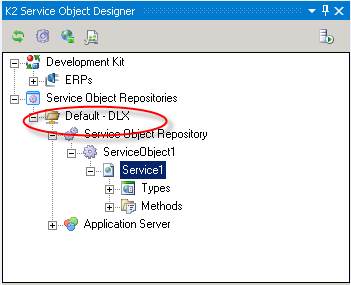
Service Object Repository
The Service Object repository is the location where the Service Objects are published to. The repository can be administered from the K2 Administration Tool or from the Object Browser in K2 Designer for Visual Studio. The Service Objects can only be consumed by SmartObjects, which can then in turn be consumed by application elements like Workflows, Reports or Forms.
The Service Objects are hosted by the default application, which enables other users developing against the same K2 connect Service instance to share the published Service Objects. The Service Objects, when published are always published to the default K2 connect Service instance which may be either a Stand Alone K2 connect Server of a cluster of K2 connect Servers.
The manner in which a service object is added to the service object repository will affect it's availability.
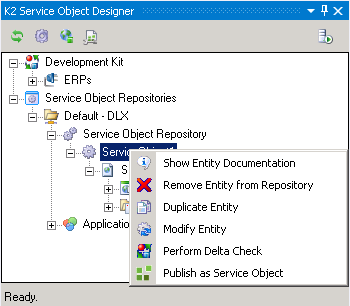
| Menu Item | Description |
|---|---|
| Show Entity Documentation | Displays any documentation which was included with the service object from the K2 connect for SAP Administration Tool. |
| Remove Entity from Repository | Removes the selected item (service object) from the repository *. |
| Duplicate Entity | Creates a copy of the selected item, for later changes. |
| Modify Entity | Modifies an existing entity, see Duplicate Entity above. |
| Perform Delta Check | Performs a consistency check on the ServiceObject, this may be useful for when a ServiceObject is a copy or an update of a previous or an existing version. |
| Publish as Service Object | If a Service Object was added manually or is a duplicate, it may need to be published so that it can be added to the SmartObject service as a Service Object. This feature does not apply to Service Objects published directly from K2 Designer for Visual Studio. |
| * Even though an item has been removed, there may still be remnants of the item present which will cause a reference to the service object to appear in the K2 Administration tool and the K2 SmartObject browser. A refresh of the K2 connect Service and the K2 SmartObject service may be required to completely remove the entity. | |
Default Service Object Repository
In the case of a distributed environment, there may be more than one SAP instance and therefore multiple K2 connect service instances listed under the Service Object Repository. A Service Object is always published to the Default Service Object Repository and the default server is only default relative to the client and is set by the client; there is no global or system setting that defines which server is the default server.
As shown in the image below, two K2 connect instances are listed. The image illustrates that:
- Default (BPDEV1) this is the default K2 connect service instance.
- BPHOST1 (Non default - no publishing against this server can currently take place).
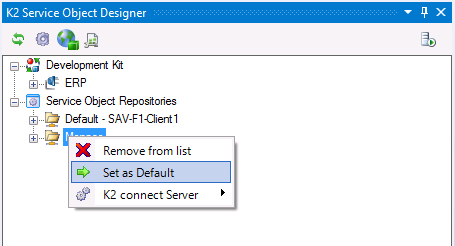
Publishing to a server other than the Default Server
It is possible to publish to an alternate server, and this is done by simply setting the alternate server to default. To change the default Server do the following:
- Right click on the Server that will be set to the default server, i.e. not the current default server.
- Locate the option Set as Default.
- Select the option. Note that the default server has changed.
- Service objects can now be published against the new default server.
Publishing Service Objects in Stand Alone and Distributed Environments
When a service object is published to the service object repository, permissions are required and the ability to publish successfully will depend on the network configuration. Stand alone systems will not necessarily encounter errors related to network related permissions.
However in distributed environments, after the service object has been published a remote restart of the K2 connect service is required. For this to take place the Developer's user account would require Administrative permissions on the K2 Server and in some organizations for security reasons this level of permissions may only be reserved exclusively for Administrators.
As a work around to this, the following Microsoft article is available for use in establishing group policies How to grant users rights to manage services in Windows Server 2003
Publishing Process
A security label for a K2 connect Server instance is only available from the User Preferences page after a Service Object has been published to it. The K2 Server must be restarted manually after publishing the ServiceObject.
The publishing a process creates a file of type SVD, and publishes the Service Objects to a repository. Before publishing, the Service Object will be checked for any service related errors that would prevent the Service Object from functioning. When no errors are found the Service Object is published to the default repository and is available for use via the SmartObject broker in the object library.
The processing window as shown below illustrates what takes place, from the user's point of view. Once the Publish ServiceObject command is clicked, the Service Object is interrogated for any errors. When non are found, the Service Object is published. From the server and service side, the Service instance is refreshed and the K2 connect Server is restarted.
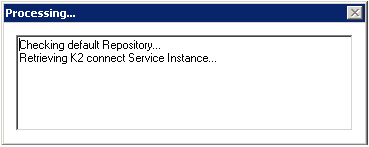
Any major changes that affects the K2 connect server or service instance requires that they be refreshed or restarted.
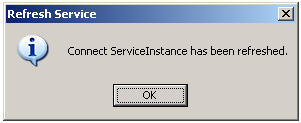
Once the process is complete, the completion message will display as below. Click OK to proceed.
Publishing Locally or to a remote destination
If the K2 connect for SAP service instance is running locally, then the Service Object can be published locally. However since the K2 connect service is running on the K2 blackpearl server, this means that the default repository would must likely be a remote location. This does not necessarily pose a problem unless the K2 connect service is not running or there are network connectivity issues; at both design and run time.
Published ServiceObject
The K2 Server must be restarted when a Service Object is published to a destination for the first time.
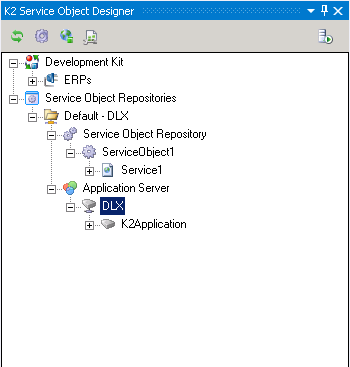
Service Objects are published once they have been completed to the Service Object Repository. The SOR is a public location; public in the context that any developer that has access rights to that particular service instance will be able to consume, delete or edit the published object.
Managing Published Service Objects
Published service objects can be moved between SOR instances. However, they can only be moved in one direction, namely from any SOR to the default SOR. Service objects cannot be moved in the opposite direction from a default SOR to any other SOR.
For further information on publishing Service Objects to different environments, see the following knowledge Base Article : Deploy service object to different environments, or copy and paste the following link into your browser : http://help.k2.com/en/articles/kb000345.aspx.
Updating existing Service Object Designer
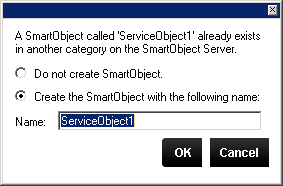
When a Service Object is published, the user has the option to create a SmartObject automatically as part of the process. When the ServiceObject has the same name or the same Service Object has already been published to the Service Object repository, the following user dialog will appear to manage publishing the new ServiceObject.
| Dialog Options | Description |
|---|---|
| Do not create SmartObject | The SmartObject will not be created. |
| Create the SmartObject with the following name | The SmartObject will be created but with a new name. |
| Name | A custom name entered by the user. |