SQL SmartObjects Method Creation
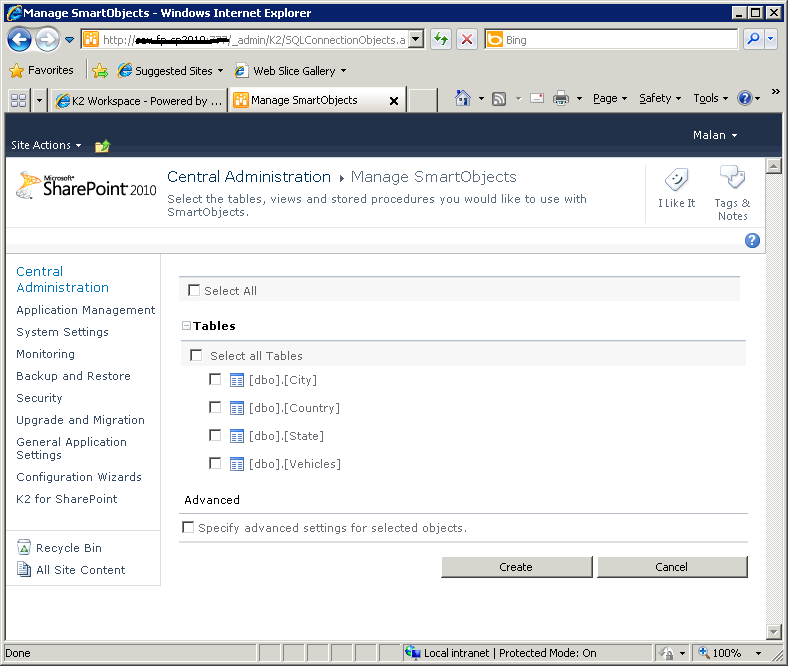
Once the connection settings have been entered correctly, the user page is able to access the database's tables and stored procedures. These items are displayed on page and the user selects which items they require to create a SharePoint SmartObject.
When the Create button is clicked the following will take place
- Each item selected will have a separate SmartObject created for it
- Stored Procedures
-
- Stored procedures that require input parameters to run will be created as SmartObjects with that dependency
- Tables
-
- Each selected table is created as an independent SmartObject
- Each SmartObject will contain a (one) GetList() method
- If tables are related to each other using foreign keys, a SmartObect association will be created automatically maintaining the association
 |
The actual items listed may vary depending on the contents of the database and not all options may be listed in the image below. |
SharePoint 2010 |
| Tables and Stored Procedures | |
|---|---|
|
Select All |
If all items are to be used enable this option |
|
Stored Procedures |
Each listed stored procedure receives an option to enable it for use when creating the SmartObject. Only required items should be enabled |
| Tables | Each Table within the database |
| Advanced | |
| Specify Advanced... | Enable this setting to configure advanced options of the SmartObject Methods at later stage |
What to Do ?
 |
Select to use all SmartObject Methods by enabling Select All, or |
 |
Select only the database table, stored procedure or view that will be used for the SmartObject(s) creation |
| Optional Step |
Advanced: Enable the Specify advanced settings for selected objects |
