Creating a User
 |
In an environment with a single database, or where the 14 databases have been consolidated, the CustomUM tables take over from the K2SQLUM database mentioned here. Scripts in these topics that reference <init>DLX,K2SQLUM</init> should be changed to <init>DLX,K2</init> ('K2' being the default consolidated database name). |
Users must be added manually to the SQL database. For security purposes, a stored procedure has been provided which will encrypt the password for each user name that will be entered.
- Open Microsoft SQL Server Management Studio
- Connect to the Server where the K2 Databases are installed
- Expand the databases and open the K2SQLUM database
- Locate the following path K2SQLUM > Programmability > Stored Procedures
- Locate the stored procedure dbo.CreateUser, right click and select Execute Stored Procedure

- The Execute Procedure Dialog will display and the user can enter the required values for a user
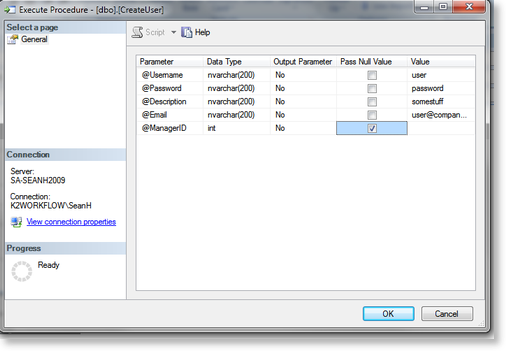
- Once the user has been entered, click OK for the stored procedure to run
Optional: This process should be completed for each individual user
