Authentication Method
The user, when configuring the SQL Service SmartObject connection must specify an authentication method for two scenarios where credentials would be required. The first instance is where the K2 Server Account or User is accessing the SQL Smart Object at run time. The second instance is where the developer accesses the SQL Server Instance and retrieves the Database schema for use at design time.
For the two instances where the credentials would need to be specified, there are three methods available and each method has different implications with regards to authentication. See in the amended screen shot (click the link), the user is required to provide an authentication option for the following scenarios:
- SQL Settings
- Design Time
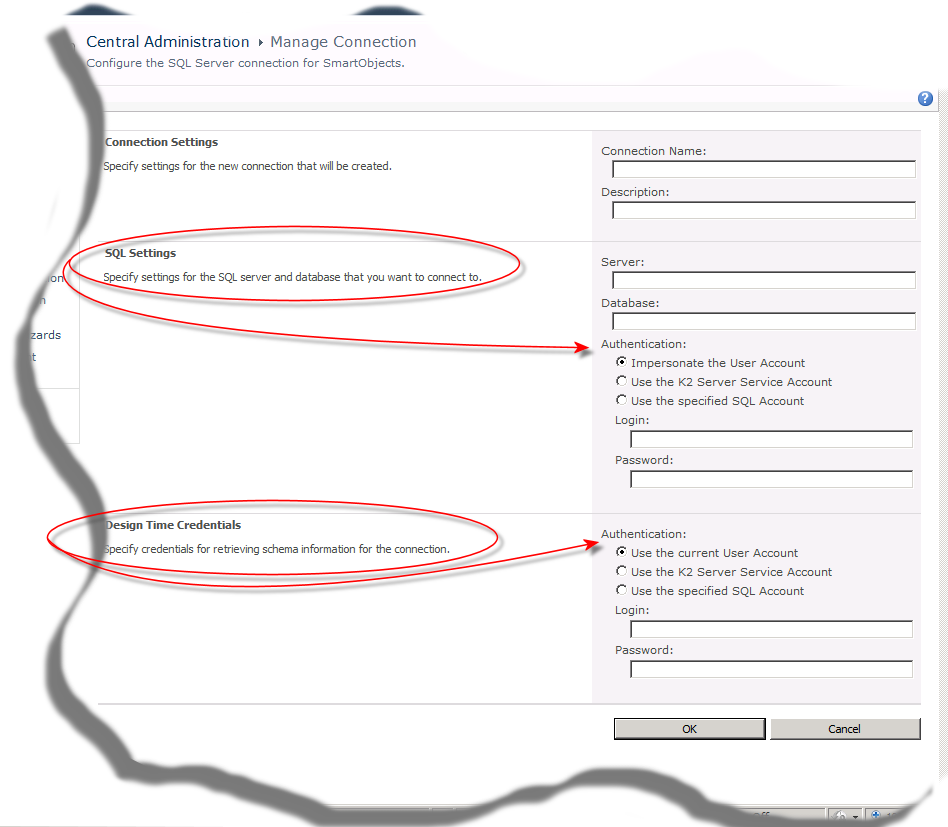
The user selects one of the following methods:
- Allow user account impersonation by the K2 Server
- Use the K2 Server Account
- Use the specified account
| Authentication Method | Description |
|---|---|
|
Allow user account impersonation by the K2 Server |
When the service call is made, the K2 Server will impersonate the user but pass the users credentials. |
|
Use the K2 Service Account |
The K2 Service Accounts credentials are used and passed to the SQL Server Instance to authenticate the service call. |
| Use the Specified Account | When this option is selected, it functions similarly to SQL Authentication. When this option is processed, a SQL Service Instance is created in the K2 Service Broker to manage the service call between the K2 Server and the SQL Server Instance. |
