Working with Comments and Attachments
The Comments and Attachments feature allow users to add Comments and Attachments to a Process Instance at runtime. These Comments and Attachments can be used later on in the Process Instances. Apart from standard K2 tools that allow you to work with Comments and Attachments, you can also work with comments and attachments through the Workflow Client API.
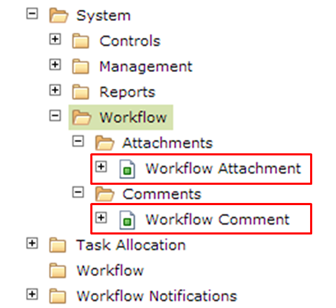
Workflow Attachment and Workflow Comment SmartObjects, located in the System Category
This sample project demonstrates how to work with comments and attachments with code: K2Documentation.Samples.WorkflowClient.CommentsAttachments.The sample project is provided for demonstration purposes only. It is not supported by K2 product support and is not intended to be used as-is in production environments.
Classes and Properties that expose the Comments and Attachments
| Classes | Methods/Properties | Purpose and Notes | |
|---|---|---|---|
| SourceCode.Workflow.Client.Connection |
AddAttachment() |
Adds an attachment. Must provide the process instance ID, provide the attachment as a System.IO.Stream | |
|
AddComment() |
Adds a comment. Must provide the Process Instance ID |
||
| GetAttachment() | Retrieves a single attachment | ||
| GetAttachments() | Retrieves all attachments for a given Process Instance | ||
| GetComments() | Retrieves all comments for a given Process Instance | ||
| SourceCode.Workflow.Client.ProcessInstance |
AddAttachment() |
Adds an attachment. Provide the attachment as a System.IO.Stream | |
|
AddComment() |
Adds a comment. |
||
| Attachments | Collection of attachments for the process instance | ||
| Comments | Collection of comments for the process instance | ||
| SourceCode.Workflow.Client.WorklistItem |
AddAttachment() |
Adds an attachment. Provide the attachment as a System.IO.Stream | |
|
AddComment() |
Adds a comment. |
||
| Attachments | Collection of attachments for the current activity instance | ||
| Comments | Collection of comments for the current activity instance | ||
| SourceCode.Workflow.Client.WorkflowAttachment | GetFile() | Retrieves the File associated with the attachment | |
| ActInstDestId | Activity Instance Destination ID that the attachment is associated with (optional) | ||
| CreatedBy | Account that added the attachment | ||
| CreatedDate | Date that the attachment was added | ||
| FileName | File Name of attachment | ||
| FileSize | File Size of attachment | ||
| FQN | Fully-Qualified name of the Account that added the attachment | ||
| Id | Unique ID of the Attachment record | ||
| ParentId | The ‘ParentId’ property will be used for ‘Replies’ | ||
| ProcInstId | ID of the Process Instance that the attachment is associated with | ||
| SourceCode.Workflow.Client.WorkflowComment | ActInstDestId | Activity Instance Destination ID that the comment is associated with (optional) | |
| CreatedBy | Account that added the comment | ||
| CreatedDate | Date that the comment was added | ||
| FQN | Fully-Qualified name of the Account that added the comment | ||
| Id | Unique ID of the comment record | ||
| Message | The comment text | ||
| ParentId | The ‘ParentId’ property will be used for ‘Replies’ | ||
| ProcInstId | ID of the Process Instance that the comment is associated with |
Code Samples
Adding a Comment
//simple connection used in this example
K2Conn.Open("localhost");
//get a handle on a process instance or worklist item.
//In this example we will open a worklist item
WorklistItem _worklistItem = K2Conn.OpenWorklistItem("[SerialNumber]");
//Add a Comment using the Connection class and the Process Instance ID
IWorkflowComment comment = K2Conn.AddComment(_worklistItem.ProcessInstance.ID, "Hello World");
//Add a Comment using the Connection class and the Worklist Item SerialNumber
IWorkflowComment comment2 = K2Conn.AddComment("[SerialNumber]", "Hello World");
//Add a Comment using the Connection class and the Process Instance ID and Activity Instance Destination ID
IWorkflowComment comment3 = K2Conn.AddComment(_worklistItem.ProcessInstance.ID, _worklistItem.ActivityInstanceDestination.ID, "Hello World");
//Add a Comment using the Process Instance _processInstance = cn.OpenProcessInstance(_processinstanceID);
IWorkflowComment procInstComment = _worklistItem.ProcessInstance.AddComment("Hello World");
//Add a Comment using the Worklistltem _worklistItem = cn.OpenWorklistItem(_serialNo);
IWorkflowComment WLItemComment = _worklistItem.AddComment("Hello World");
}
Retrieving Comments
//simple connection used in this example
K2Conn.Open("localhost");
//get a handle on a process instance or worklist item.
//In this example we will open a worklist item
WorklistItem _worklistItem = K2Conn.OpenWorklistItem("[SerialNumber]");
//Get all the Comments using the Process Instance ID
IEnumerable < IWorkflowComment > comments1 = K2Conn.GetComments(_worklistItem.ProcessInstance.ID);
//Get all the Comments using a Worklist Item SerialNumber
IEnumerable < IWorkflowComment > comments2 = K2Conn.GetComments("[SerialNumber]");
//Get all the Comments using a Process Instance ID and Activity Instance Destination"s ID
IEnumerable < IWorkflowComment > comments3 = K2Conn.GetComments(_worklistItem.ProcessInstance.ID, _worklistItem.ActivityInstanceDestination.ID);
//Get all the Comments from the Process Instance Comments
IEnumerable < IWorkflowComment > procInstComments = _worklistItem.ProcessInstance.Comments;
foreach(IWorkflowComment procInstComment in procInstComments) {
//do something with the comment value
string comment = procInstComment.Message;
}
//Get all the Comments from the Worklist Item Comments
IEnumerable < IWorkflowComment > wlItemComments = _worklistItem.Comments;
foreach(IWorkflowComment wlItemComment in wlItemComments) {
//do something with the comment value
string comment = wlItemComment.Message;
}
}
Adding Attachments
//simple connection used in this example
K2Conn.Open("localhost");
//TODO: stream in the file you want to add.
//in this example we're loading from the file system
System.IO.Stream _fileStream = null;
string _fileName = "[FileName.doc]";
string fullPath = string.Format(@ "C:\Temp\{0}", _fileName);
//Check if the file exists at the location.
if (File.Exists(fullPath)) {
//Get the FileStream
_fileStream = File.OpenRead(fullPath);
}
//get a handle on a process instance or worklist item.
//In this example we will open a worklist item
WorklistItem _worklistItem = K2Conn.OpenWorklistItem("[SerialNumber]");
//Add an Attachment using the Connection class and the Process Instance ID
IWorkflowAttachment attachment1 = K2Conn.AddAttachment(_worklistItem.ProcessInstance.ID, _fileName, _fileStream);
//Add an Attachment using the Connection class and the Worklist Item SerialNumber
IWorkflowAttachment attachment2 = K2Conn.AddAttachment("[SerialNumber]", _fileName, _fileStream);
//Add an Attachment using the Connection class and the Process Instance ID and Activity Instance Destination ID
IWorkflowAttachment attachment3 = K2Conn.AddAttachment(_worklistItem.ProcessInstance.ID, _worklistItem.ActivityInstanceDestination.ID, _fileName, _fileStream);
//Add an Attachment using the Process Instance
IWorkflowAttachment ProcInstAttachment = _worklistItem.ProcessInstance.AddAttachment(_fileName, _fileStream);
//Add an Attachment using the Worklistltem
IWorkflowAttachment WLItemAttachment = _worklistItem.AddAttachment(_fileName, _fileStream);
}
Adding Attachments (Async)
You may want to add attachment in an asynchronous fashion, in other words create the attachment object but do not upload the actual file content until you specifically want to do so. This code sample demonstrates this approach.
//simple connection used in this example
K2Conn.Open("localhost");
//TODO: stream in the file you want to add.
//in this example we're loading from the file system
System.IO.Stream _fileStream = null;
string _fileName = "[FileName.doc]";
string fullPath = string.Format(@ "C:\Temp\{0}", _fileName);
//Check if the file exists at the location.
if (File.Exists(fullPath)) {
//Get the FileStream
_fileStream = File.OpenRead(fullPath);
}
//get a handle on a process instance or worklist item.
//In this example we will open a worklist item
WorklistItem _worklistItem = K2Conn.OpenWorklistItem("[SerialNumber]");
//Add an "empty" attachment without the file content by passing null as the content
//This approach can be used for async purposes
//to create the attachment metadata first, and then upload the file.
IWorkflowAttachment attachmentWithoutContent = K2Conn.AddAttachment(_worklistItem.ProcessInstance.ID, _fileName, null);
//Upload the actual file content
//Note: You can only upload the file once for an "empty" attachment.
IAttachment attachmentWithContent = K2Conn.UploadAttachmentContent(attachmentWithoutContent.Id, _fileStream);
}
Retrieving Attachments
//simple connection used in this example
K2Conn.Open("localhost");
//get a handle on a process instance or worklist item.
//In this example we will open a worklist item
WorklistItem _worklistItem = K2Conn.OpenWorklistItem("[SerialNumber]");
//Get all the Attachments using the Process Instance ID
//By default this call will always return the attachment files.
IEnumerable < IWorkflowAttachment > attachments1 = K2Conn.GetAttachments(_worklistItem.ProcessInstance.ID);
//Get all the Attachments using the SerialNumber
//By default this call will always return the attachment files.
IEnumerable < IWorkflowAttachment > attachments2 = K2Conn.GetAttachments("[SerialNumber]");
//Get all the Attachments using the Process Instance ID and Activity Instance Destination ID
//By default this call will always return the attachment"s files.
IEnumerable < IWorkflowAttachment > attachments3 = K2Conn.GetAttachments(_worklistItem.ProcessInstance.ID, _worklistItem.ActivityInstanceDestination.ID);
//Get all the Attachments from the Process Instance "Attachments" property
IEnumerable < IWorkflowAttachment > procInstAttachments = _worklistItem.ProcessInstance.Attachments;
//Get all the Attachments from the Worklist Item "Attachments" property
_worklistItem = K2Conn.OpenWorklistItem("[SerialNumber]");
IEnumerable < IWorkflowAttachment > wlitemAttachments = _worklistItem.Attachments;
//once you have retrieved the attachments, you can iterate over them
foreach(IWorkflowAttachment attachment in wlitemAttachments) {
string filename = attachment.FileName;
}
}
Retrieving Attachments – excluding the files
By default, the content of the file attachments will be returned unless you specifically state that you do not want the contents returned. For example, you may want to "get" the attachments for a process instance, but only list the file names. At a alter point, you will selectively download the actual content of the attachment file. This code sample demonstrates how to achieve this "async" on on-demand style of loading the attachment content.
//simple connection used in this example
K2Conn.Open("localhost");
//get a handle on a process instance or worklist item.
//In this example we will open a worklist item
WorklistItem _worklistItem = K2Conn.OpenWorklistItem("[SerialNumber]");
//Get all the Attachments using the Process Instance ID
//pass "false" for the includeFile parameter to only load the file on demand.
IEnumerable < IWorkflowAttachment > attachments1 = K2Conn.GetAttachments(_worklistItem.ProcessInstance.ID, false);
//Get all the Attachments using the SerialNumber
//pass "false" for the includeFile parameter to only load the file on demand.
IEnumerable < IWorkflowAttachment > attachments2 = K2Conn.GetAttachments("[SerialNumber]", false);
//Get all the Attachments using the Process Instance ID and Activity Instance Destination ID
//pass "false" for the includeFile parameter to only load the file on demand.
IEnumerable < IWorkflowAttachment > attachments3 = K2Conn.GetAttachments(_worklistItem.ProcessInstance.ID, _worklistItem.ActivityInstanceDestination.ID, false);
//once you have retrieved the attachments, you can iterate over them
foreach(IWorkflowAttachment attachment in attachments3) {
string filename = attachment.FileName;
//use the attachment.GetFile() method to load the attachments file
using(System.IO.Stream downloadStream = attachment.GetFile()) {
//do something with the downloaded filestream
}
}
}
Retrieving Attachment
You can retrieve a specific attachment directly, if you know the attachment ID.
//simple connection used in this example
K2Conn.Open("localhost");
int _attachmentID = 1;
//Get the Attachment by passing the Attachment ID
//By default, this call will always return the attachment file content.
IWorkflowAttachment attachment = K2Conn.GetAttachment(_attachmentID);
//to load the file content on-demand, pass "false" for the includeFile parameter.
IWorkflowAttachment attachmentNoFile = K2Conn.GetAttachment(_attachmentID, false);
//when ready, get the file content
System.IO.Stream _fileStream = attachmentNoFile.GetFile();
}