Opening and completing a WorklistItem
If you want to open a client event task (also known as a Worklist Item), update some data and/or complete the task, you will need to use the WorklistItem object. You can locate a WorklistItem in two ways: the first (more efficient) approach is to use the task’s serial number and call the OpenWorklistItem(serialNumber) method. This will return a WorklistItem object which you can then use to update and complete the user task. The alternative approach (not recommended due to performance) is to return the user’s worklist with WorkListCriteria, and then locate the specific task you are looking for by iterating over the worklist items.
The serial number for a task is normally appended to the Client Event URL as a query string parameter. When using the Client Event wizard in a workflow, you should see where K2 appends the serial number (SERIALNO) for the task to the Web Page URL: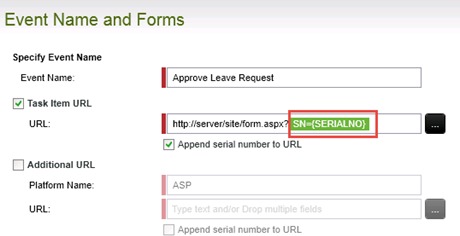
The code snippet illustrates how to open, update, and then complete ("finish") a worklist item, assuming you have the Serial Number for the item.
This sample code requires references to the assemblies:
- SourceCode.HostClientAPI
- SourceCode.Workflow.Client
//open a simple connection for simplicity
K2Conn.Open("localhost");
//get the task serial number from somewhere (e.g. query string or worklist)
string serialNumber = "[ProcessInstanceId_ActivityInstanceDestinationId]";
//open worklist item with serial number
//or locate worklistitem in worklist collection, and open it using K2WLItem.Open();
//opening the worklist item allocates it to the current user by default
//you can use the Alloc parameter to modify this default behavior
WorklistItem K2WListItem = K2Conn.OpenWorklistItem(serialNumber);
//once item is open, read some data from the item, or update values
string oldFolio = K2WListItem.ProcessInstance.Folio;
K2WListItem.ProcessInstance.Folio = "NewFolioValue";
//iterate over the data fields collection
foreach(DataField dataField in K2WListItem.ProcessInstance.DataFields) {
//do something with each datafield, e.g. read or set value
string fieldName = dataField.Name;
string fieldValue = dataField.Value.ToString();
}
//read the available actions for the task
foreach(SourceCode.Workflow.Client.Action action in K2WListItem.Actions) {
//do something
}
//update datafields before completing the task, if needed
K2WListItem.ProcessInstance.DataFields["[StringDataFieldName]"].Value = "[NewValue]";
//to finish the task, call Action.Execute method
//with the appropriate action name
K2WListItem.Actions["[ActionName]"].Execute();
}