Asynchronous Server Events
Asynchronous Server Events provide a mechanism for "pausing" a workflow and wait for an external application to programmatically finish the server event before the workflow resumes. They behave similarly to client events, the difference being that asynchronous server events expect "machine" input from an external system or application, whereas a client event expects "user" input by one or more destination users.
Consider an example where a workflow will call an external organization to place an order. That external organization may take hours or days to complete the order request and send back confirmation. It would be inefficient to poll the external system for all that time and waiting for an automatic response would likely result in a time out. BY using the Asynchronous server event, you can essentially complete the event but the workflow will not continue until the external system has opened the server item and completed it, allowing your workflow to continue.
There are three parts to implementing an asynchronous server event:
- In a workflow, use a default server event and set the event to execute asynchronously.
- Pass the serial number through to the other system.
- When the other system is ready to finish the task, use the workflow client API in custom code and call the OpenServerItem() method, passing in the serial number that was sent in step 2.
1. In a workflow, use a default server event and set the event to execute asynchronously:
2. In the server event code, pass the serial number through to the other system. The external system will need to use this serial number to complete the server task - think of this as a "correlation id" which will allow the external system to find and complete the specific workflow task instance assigned to it.
string serialNo = K2.SerialNumber;
//TODO: pass the server item serial number to the other system
//think of this as the "correlation id" the other system
//will use to complete the server item later on
3. When the other system is ready to finish the task, use the workflow client API to write code that calls the OpenServerItem() method, passing in the serial number that was sent in step 2.
//open a simple connection
K2Conn.Open("k2servername");
ServerItem svrItem = K2Conn.OpenServerItem("[serialNo]");
//TODO: do something with the server item, like updating a datafield
svrItem.ProcessInstance.DataFields["[StringFieldName]"].Value = "somevalue";
//finish the server item to tell the workflow to continue
svrItem.Finish();
}
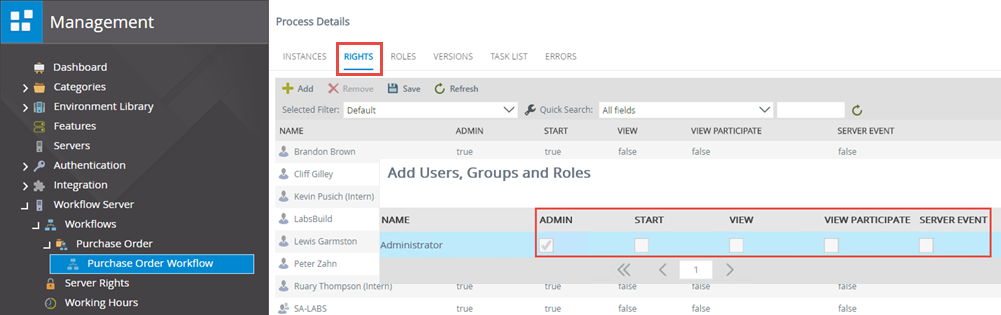
For security purposes, the account that is executing the OpenServerItem() method requires the Server Event permission on the workflow definition, as shown below: