K2 Workflow Designer - Designer Options
Selecting the Configure Designer Options function on the Main Menu will open the following Designer Options screen:
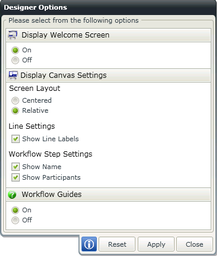
Fig. 1. Configure Designer Options
| Feature | Options | What it is |
|---|---|---|

|
||
| On | The Welcome screen is displayed when accessing the K2 Workflow Designer | |
| Off | The Welcome screen not displayed when accessing the K2 Workflow Designer | |

|
||
| Screen Layout | Centered | The design canvas displays the Workflow steps centered to the canvas |
| Relative | The design canvas displays the Workflow steps relative to the other steps in the Workflow | |
| Line Settings | Show Line Labels | Line Labels are visible. When un-ticked the Line Labels are not displayed |
| Workflow Step Settings | Show Name | When selected, the Outcome label is reflected on the canvas |
| Show Participants | When selected, the Participants are reflected on the canvas | |