Advanced Concepts
This topic provides more information on advanced concepts related to K2 connect
 K2 connect Architectural Layout
The diagram below illustrates the connectivity between the various SAP interactive front ends that are available. K2 connect for SAP connects via the RFC Adapter and only RFC enabled BAPIs are available. BAPIs not RFC-enabled (although visible from the browser) cannot be accessed. The K2 connect for SAP tooling helps those who are not familiar with SAP or the SAP tooling. For more advanced functionality, a developer would use the SAP GUI, a tool provided by SAP.
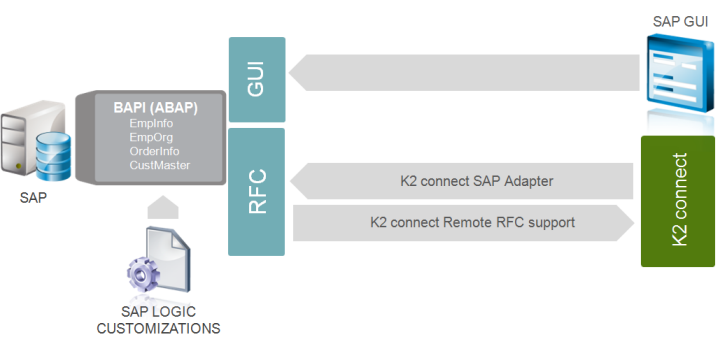
K2 connect and K2 SmartObject Interaction
The following diagram illustrates the interaction between the K2 connect Service Object Designer and K2 SmartObjects designed to access SAP BAPIs.
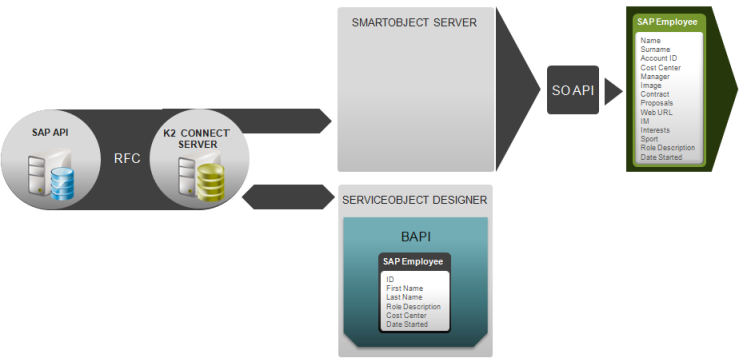
Service Objects
Service Object Physical Representation
The K2 connect Service Objects are represented physically on the local hard drive in SVD file format. The SVD files are associated with a representation of them in the K2 connect database. When there is no connection between the SQL Server and the solution under development that contains the Service Objects, the Service Objects are unavailable.
Service Object Graphical Representation
The Service Object is presented graphically on the design canvas in Visual Studio. When designing Service Objects, the design canvas represents the Service Object as a container for service methods. A Service Object can contain one or more service methods.
Service Object Repository
The Service Object Repository is the location where all published Service Objects are stored. The Service Object Repository can be shared in two contexts. The first is where a Service Object is created by one developer and then consumed by another developer who has access to the same Service Object Repository. The second is where K2 connect Servers are configured in an NLB environment and the servers make use of the same Service Object Repository.
User Types and Role
The following information is provided for Administrators who created SAP accounts or have existing accounts, and these accounts are being used to access the SAP BAPI structure from K2 connect for SAP instead of using the K2 Service Account.
User Types
The SAP system categorizes users into several types for different purposes as shown in the table below:
| Type | Purpose |
|---|---|
| Dialog | Individual, interactive system access. |
| System | Background processing and communication within a system (such as RFC users for ALE, Workflow, TMS, and CUA). |
| Communication | Dialog-free communication for external RFC calls. |
| Service | Dialog user available to a larger, anonymous group of users. |
| Reference | General, non-person related users that allow the assignment of additional identical authorizations, such as for Internet users created with transaction SU01. No log on is possible. |
K2 connectcan either use a Dialog user or a Communication user. A Dialog user is only required to do ABAP debugging via the Test Cockpit. For more information on user roles, see the SAP User Types and Permissions in the Permissions topic.
This information is provided in the SAP documentation that can be viewed at: http://help.sap.com/erp2005_ehp_05/helpdata/EN/3d/3272396ace5534e10000000a11405a/frameset.htm